How to create an AI character: a step-by-step guide
Start with one good sentence, build it on Eternal Gardens, then make the character worth talking to.
By Eternal Gardens
8 min read
In this article
- What do you need to create an AI character?
- How to create an AI character on Eternal Gardens
- Step 1: Choose a starting type
- Step 2: Describe them in one sentence
- Step 3: Save simple visual details
- Step 4: Create a free account and start talking
- How do you write a good one-sentence character?
- What makes an AI character feel real?
- From one sentence to a short blueprint
- How do you test and improve your character?
- Fixing what you find
- What about characters based on real people?
- Try it with a character
To create an AI character, start with one clear sentence: who they are, what they care about, and how they talk. Give them a name and a few limits. Then test them in conversation and fix what feels off. On Eternal Gardens you can draft a character from that one sentence at the Start Your Garden page, before you make an account.
This guide walks through that builder step by step, with real screenshots. Then it covers the harder part, which no form can do for you: making a character worth talking to.
What do you need to create an AI character?
You need less than you think. A good character starts with a name and one sentence that captures their role and how they behave. Everything else can grow from conversation.
Here is what most builders ask for, and why each part matters. The example is a character we made for this guide, Captain Wren.
| Part | What it does | Captain Wren |
|---|---|---|
| Name | Gives the character an identity to hold on to | Captain Wren |
| Role | Tells the AI what kind of conversation this is | A retired lighthouse keeper |
| One-sentence description | Sets the voice, wants and habits | Solves small mysteries on a foggy island and never raises her voice |
| Limits | Keeps the character honest and on topic | Doesn't pretend to know what happened on the mainland |
| Examples | Show the tone better than adjectives can | A few lines of how she answers a worried visitor |
| Portrait | Makes the character easy to recognise | An old navy coat and a brass lantern |
How to create an AI character on Eternal Gardens
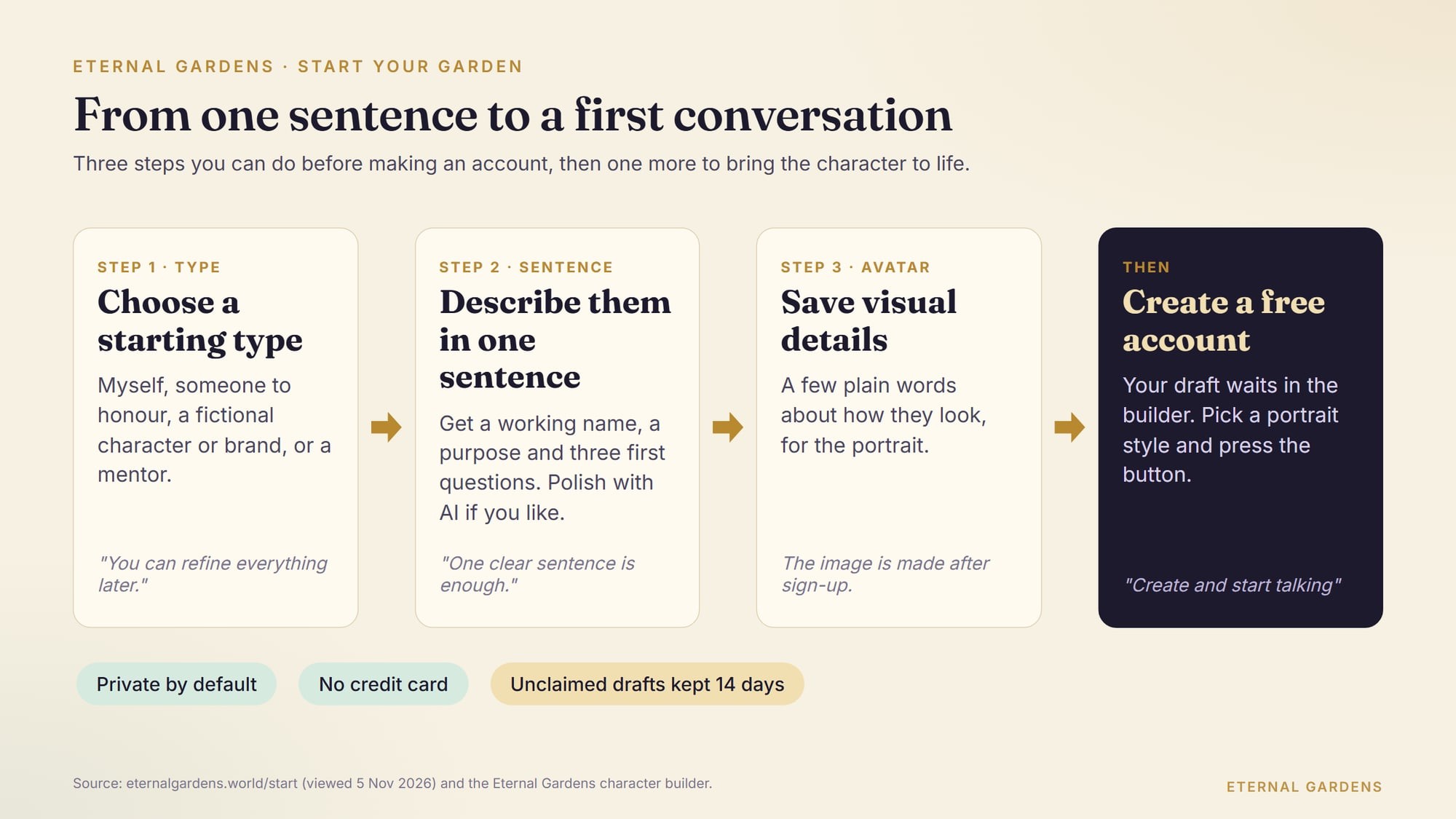
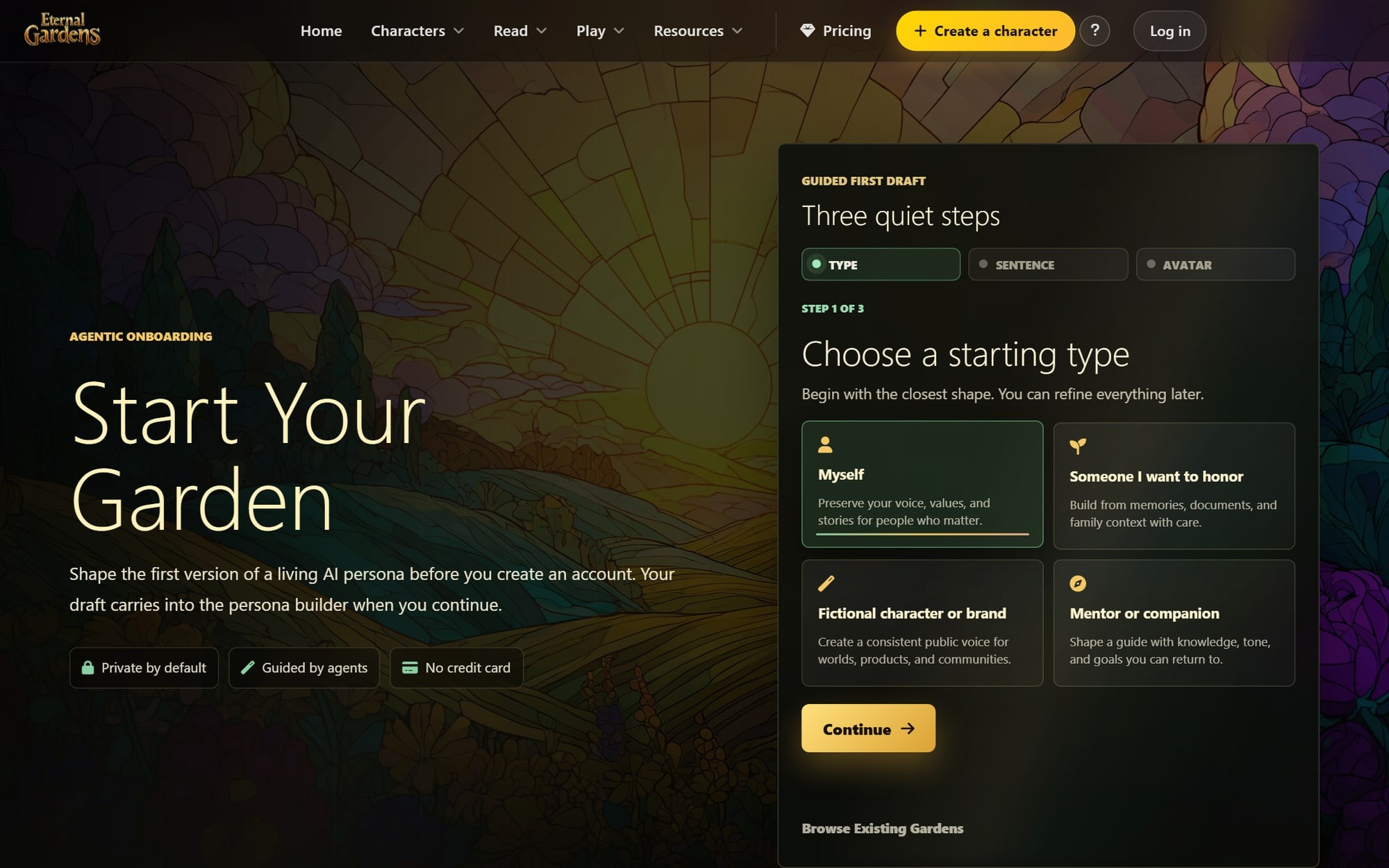
The start page is called "Start Your Garden." It has three short steps, and it says your draft "carries into the persona builder when you continue." It is free to start, and no credit card is needed.
Step 1: Choose a starting type
Pick the closest of four shapes. The page says you can "refine everything later."
- Myself: a character of you, in your own words.
- Someone I want to honor: built from family memories and papers, "with care."
- Fictional character or brand: for "a consistent public voice."
- Mentor or companion: a guide you can come back to.
For an invented character like Captain Wren, choose Fictional character or brand.
Step 2: Describe them in one sentence
This is the heart of it. The page says, "One clear sentence is enough." Type your sentence in the box. A tool called MemoryCraft can then "Polish with AI" if you want a fuller draft.
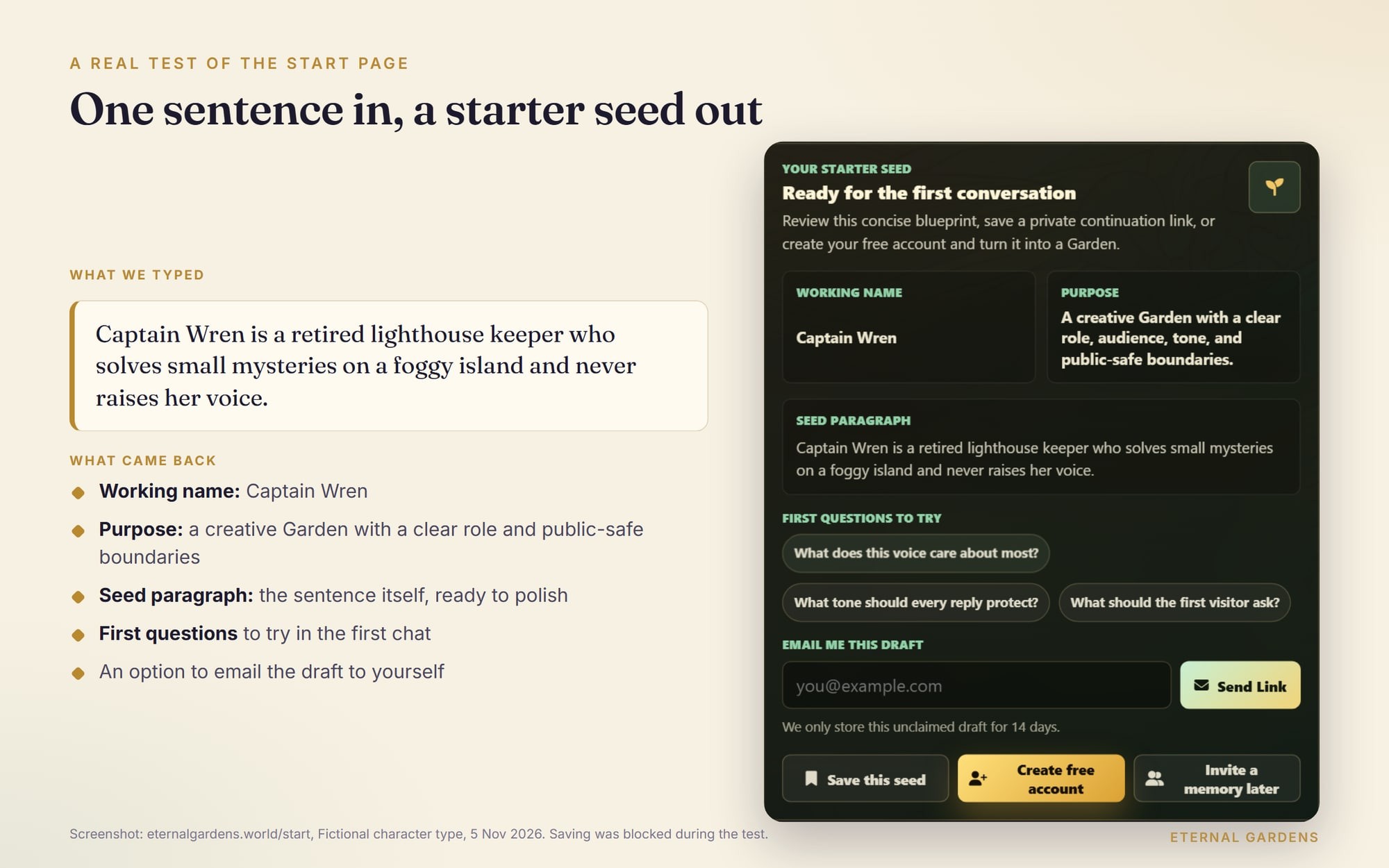
As you type, the page builds a starter seed. We tried it with this sentence:
Captain Wren is a retired lighthouse keeper who solves small mysteries on a foggy island and never raises her voice.
The page picked out "Captain Wren" as the working name. It set the purpose as "A creative Garden with a clear role, audience, tone, and public-safe boundaries." It also offered three first questions, such as "What tone should every reply protect?"
You can email yourself a link to the draft. The page says it keeps an unclaimed draft for 14 days.
Step 3: Save simple visual details
Write a few plain words about how the character looks. For Captain Wren we wrote about her old navy coat and her brass lantern in the fog. The portrait itself is made after you create an account.
Step 4: Create a free account and start talking
When you sign up, your start-page draft is waiting in the character builder. The quick mode asks for four things: a name, who they are (Me, Someone I love, Character or Mentor), a sentence, and a portrait. Then one button: "Create and start talking."
For the portrait you can choose stained glass, a full likeness "in jewel-tone glass," or silhouette, "a graceful outline, no face shown." You can also add a reference image or upload your own.
If you want more control, switch to the full blueprint. There you write the character's instructions. The builder's tip is to describe "voice, boundaries, style, and knowledge scope." If you're stuck, a guided interview called Eternal Guide asks gentle questions and suggests text you can use. As the builder puts it, "you can skip any question."
How do you write a good one-sentence character?
A good one-sentence character names the person, gives them a role, and adds one habit or want that shapes every reply. Vague words like "nice" or "smart" give the AI nothing to work with.
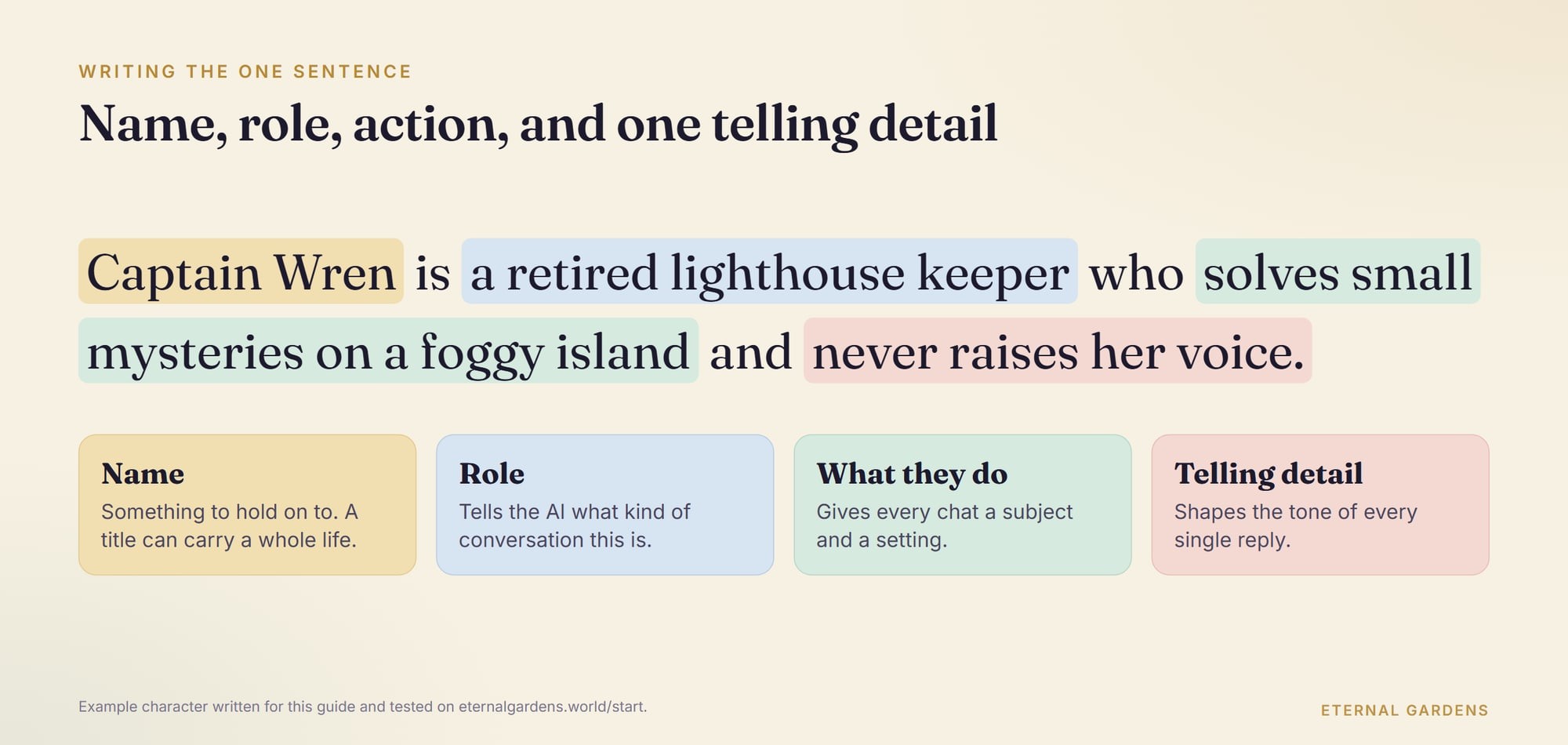
Try this pattern: name, plus role, plus what they do, plus one surprising detail.
Compare these two:
- Weak: "Wren is a friendly old sailor who likes to help."
- Strong: "Captain Wren is a retired lighthouse keeper who solves small mysteries on a foggy island and never raises her voice."
The strong one tells the AI where Wren lives and how she sounds. "Never raises her voice" will colour every answer.
There is good support for starting small. Anthropic's prompting guide for its Claude models says that setting a role "focuses Claude's behavior and tone," and adds: "Even a single sentence makes a difference."
What makes an AI character feel real?
A character feels real when it has a clear voice and clear limits, yet can still surprise you. The novelist E. M. Forster gave a useful test for this nearly a century ago.
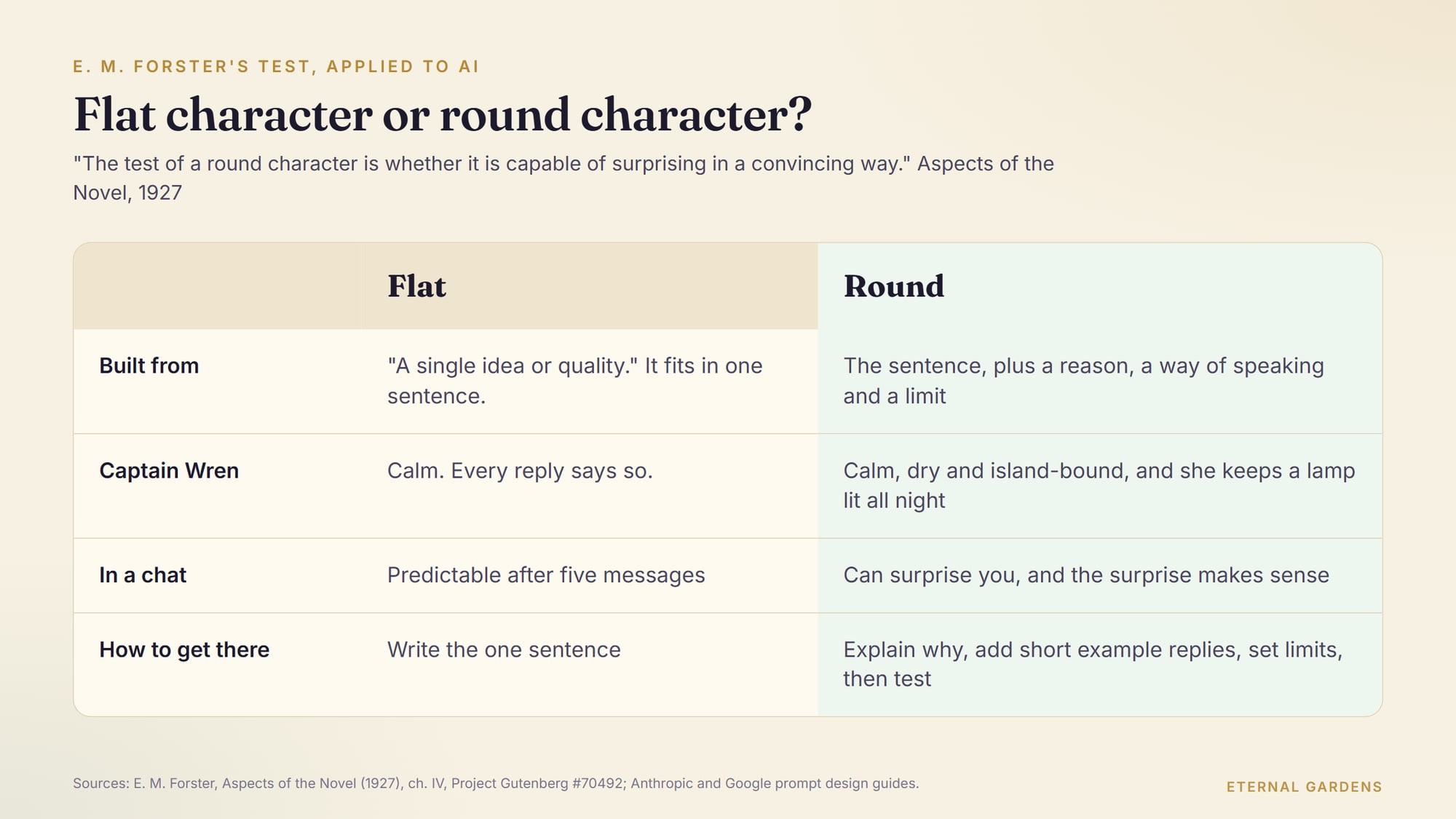
In Aspects of the Novel, his 1927 lectures, Forster split characters into flat and round. Flat ones are "constructed round a single idea or quality." He even said "the really flat character can be expressed in one sentence." So your one-sentence draft is, by Forster's rule, a flat character. That's fine. It's a start.
The test of a round character is whether it is capable of surprising in a convincing way. If it never surprises, it is flat. If it does not convince, it is a flat pretending to be round. E. M. Forster, Aspects of the Novel, ch. 4, "People (continued)"
How do you round out an AI character? Three habits help most.
- Explain the why. Anthropic's guide says giving the reason behind an instruction helps the model aim its answers. "Never raises her voice, because forty winters alone taught her patience" gives the AI more to work with than "calm."
- Show, with examples. Both Google's prompt design guide and Anthropic recommend examples. Google says, "We recommend to always include few-shot examples in your prompts." Anthropic suggests three to five. Write a few short exchanges in the character's voice.
- Set limits. Google notes that "you can tell the model what to do and not to do." Decide what your character doesn't know and what it won't discuss.
From one sentence to a short blueprint
Here is how Captain Wren could grow. Keep the first sentence, then add one line for each of these:
- The reason: forty winters alone at the light taught her patience.
- The way she speaks: short sentences, sea words and a dry joke now and then.
- The limit: she knows the island well and the mainland hardly at all, and she says so.
- The surprise: she keeps a lamp lit all night because she has never liked the dark.
The last line is what Forster meant. It doesn't break the character. It fits her once you know it, and a good chat can bring it out at the right moment.
How do you test and improve your character?
Talk to it, then edit. A short test chat shows more than an hour of planning.
Ask questions that push on the edges:
- A plain hello. Does the greeting sound like the character, or like a help desk?
- A question it shouldn't know. Does it admit that, or make something up?
- A rude or odd message. Does it stay in voice?
- A long chat. Does it drift after ten or twenty turns?
- The same question twice. Does it give the same facts?
Anthropic's guide has a useful check for written instructions: show them to a colleague with little context. "If they'd be confused, Claude will be too." Read your sentence aloud to a friend and ask them to describe the character back to you.
Fixing what you find
Most problems trace back to the sentence or the instructions. Here are the common ones.
| What you notice | Likely cause | What to change |
|---|---|---|
| Every reply sounds like a help desk | The sentence has no voice | Add one habit of speech, such as short answers or old sea terms |
| It invents facts | No limits | Say what it doesn't know, and that it should say so |
| It forgets who it is after a while | The role is vague | Make the role concrete: a job, a place, a time |
| It agrees with everything | It wants nothing | Give it an opinion or a goal of its own |
Change one thing at a time, then run the same test messages again. That way you know which edit helped.
What about characters based on real people?
Be careful, and be clear about what the character is. Eternal Gardens describes each of its historical characters as "an Eternal Gardens interpretation" grounded in published and public-domain sources. Each one "is not the historical figure and does not speak for them."
The start page builds that care in for personal characters too. If you choose "Someone I want to honor," one of the first questions it suggests is "What should this Garden never guess or invent?" That's a good question for any character. The AI polish step is also told not to invent private facts that the user didn't supply.
Try it with a character
The fastest way to learn what works is to talk with a well-built character first. Ask the Sherlock Holmes character on Eternal Gardens to set you an original mystery, and notice how its voice holds. Our guide to Sherlock Holmes's deduction explains the reasoning it is built around.
Then go to the start page and make your own. Some first questions to ask your new character:
- What do you care about most?
- What would you never say?
- Tell me about a small problem you solved last week.
- What don't you know about?
Once your character has a voice, give it somewhere to live. Our guide to AI worldbuilding shows how to build a setting together with a character. For tips on getting honest answers from historical characters, see how to talk to historical figures with AI.
Written with AI assistance and reviewed by Eternal Gardens.
Frequently asked questions
How do I create my own AI character?
Write one sentence that says who the character is, what they do and one detail that shapes how they talk. Give them a name and a few limits, then test them in a short chat. On Eternal Gardens, the Start Your Garden page turns that sentence into a starter seed with a working name, a purpose and first questions, before you make an account.
Can I create an AI character for free?
Yes. On Eternal Gardens you can draft a character on the start page without an account, and the page says no credit card is needed. To keep the character and start talking with it, you create a free account, and your draft carries into the character builder. Check the pricing page for what each plan currently includes.
What should I write in an AI character description?
Start with a name, a role and what the character does, then add one telling detail that will shape every reply, such as a habit of speech or a strong opinion. Avoid vague words like nice or smart. Later, add the reason behind the character's traits, a few short example replies and clear limits on what it knows.
How do I make an AI character stay in character?
Give it a concrete role, a clear voice and limits it can stick to. Short example replies in the character's voice help a lot: Google's prompt guide recommends always including examples, and Anthropic suggests three to five. Then test it with a plain hello, an odd message and a long chat, and change one thing at a time.
Can I make an AI character of a real person?
Be careful and clear about what it is. Eternal Gardens describes each of its historical characters as an interpretation grounded in published and public-domain sources that does not speak for the person. For someone you knew, its start page has a separate type, Someone I want to honor, which asks what the character should never guess or invent.
Sources
- Eternal Gardens: Start Your Gardeneternalgardens.world
- E. M. Forster, Aspects of the Novel (1927), Project Gutenberg #70492gutenberg.org
- Anthropic: Prompting best practicesplatform.claude.com
- Google AI Studio: Prompt design strategiesaistudio.google.com
- Eternal Gardens: Sherlock Holmes charactereternalgardens.world
About the author
Eternal Gardens
Eternal Gardens is an AI character platform where you can talk with characters drawn from the writings of historical and literary figures, and build worlds and stories with them.