AI worldbuilding: how to build a world with an AI character
Why AI forgets your world, how a canon list fixes it, and how to grow a setting one conversation at a time.
By Eternal Gardens
7 min read

In this article
- What is AI worldbuilding?
- Why build a world through a character?
- How to build a world with an AI character on Eternal Gardens
- 1. Plant the seed
- 2. Talk, and let details surface
- 3. Review and add notes
- 4. Watch it grow, then publish
- 5. Bring in other characters
- Worldbuilding tips that work with AI
- Start small and local
- Give your world rules, and limits
- Keep a canon list
- Ask the character, not the narrator
- Keep the good surprises
- Questions that grow a world
- What can go wrong
- Try it with a character
AI worldbuilding means inventing a fictional world with an AI as your creative partner. It works best when you build through a character who lives in that world, keep a short list of facts that never change, and add one place or person at a time. The AI suggests. You decide what becomes true.
Most guides to AI worldbuilding hand you a list of prompts. This one gives you a method, explains why AI forgets things, and shows how to grow a world with a character on Eternal Gardens.
What is AI worldbuilding?
AI worldbuilding is the use of a chatbot or AI character to help create a setting: its places and people, and the rules that hold it together. The AI is quick at ideas. It is weak at remembering them, so you have to keep the record.
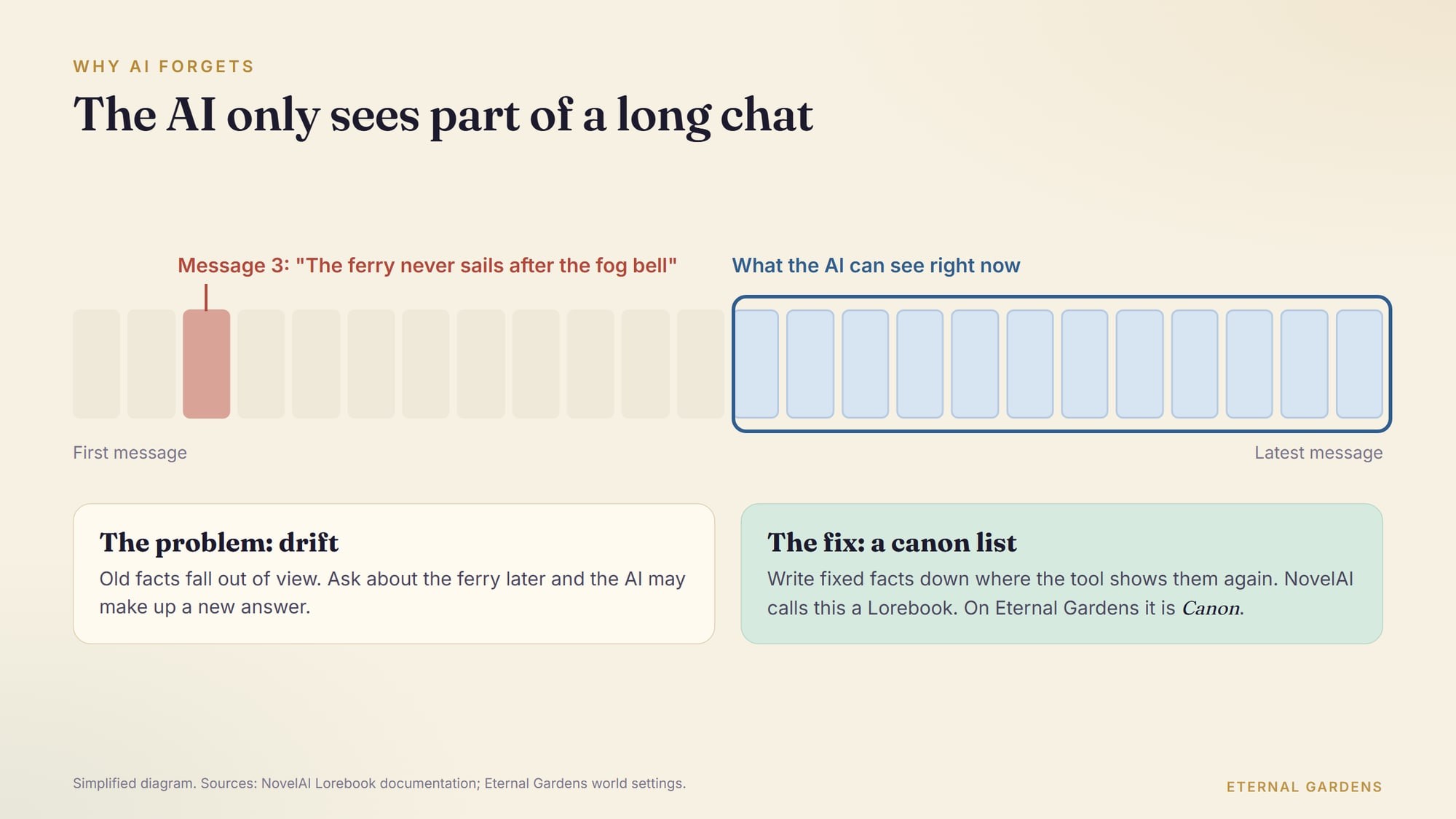
That weakness comes from how these tools work. A model only "sees" the text in front of it at that moment, called its context. Tools for long stories get around this with a kind of notebook. NovelAI, for example, calls its version a Lorebook. Its docs describe it as "a repository for supplemental information that's added to the AI's context as each entry comes up in your story." An entry is added when one of its keywords appears in the recent story.
The lesson for any tool is the same. If a fact matters, write it down somewhere the AI will be shown it again. Don't trust it to remember a detail from fifty messages ago.
Why build a world through a character?
A character gives your world a point of view. Instead of asking "describe the capital city," you ask someone who lives there what the market smells like in winter. The answers come out specific and personal. That is what makes a world feel lived in.
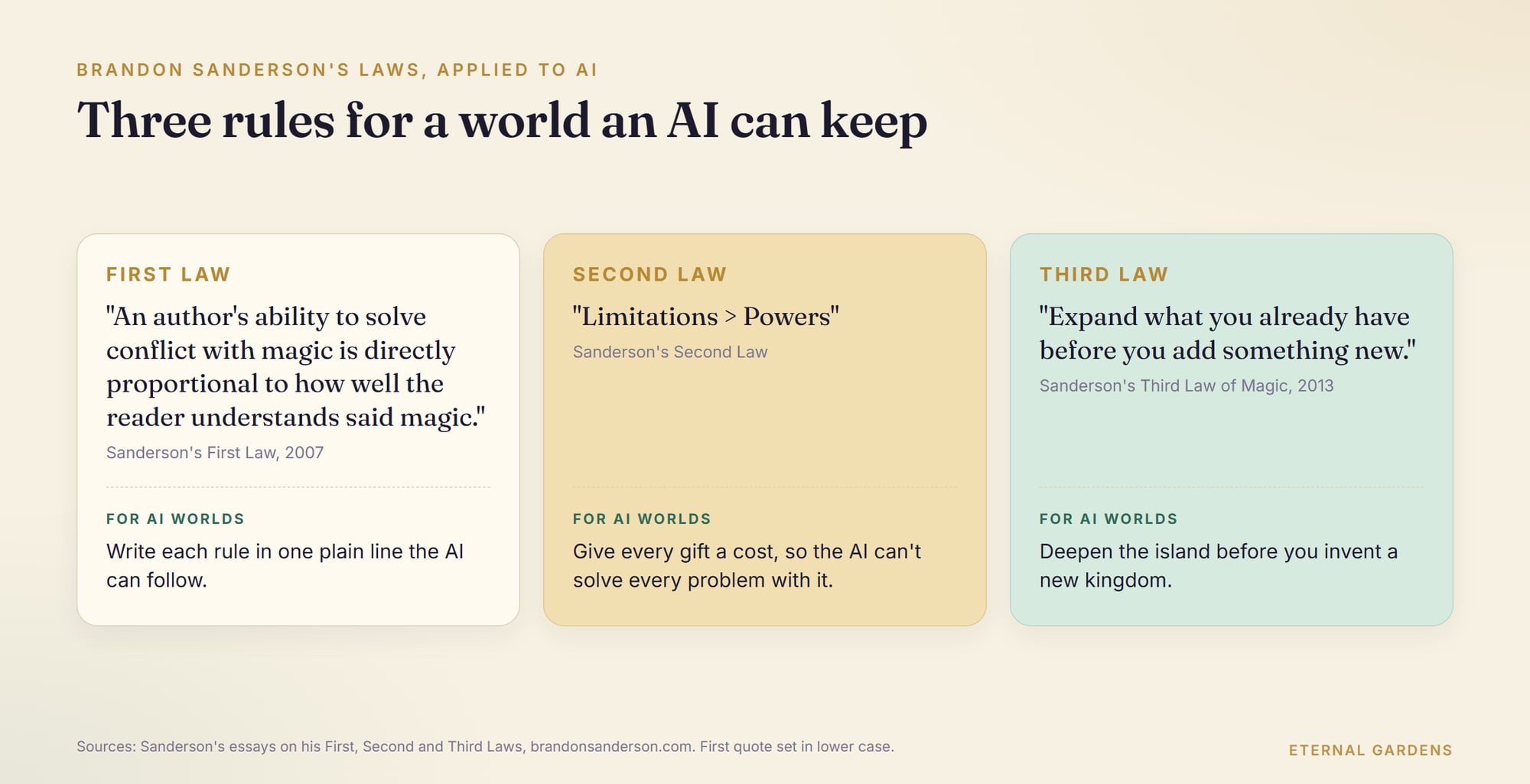
It also keeps you honest. A world told through one person grows outward from what that person knows. That is close to the advice of the fantasy novelist Brandon Sanderson. His essay "Sanderson's Third Law of Magic" puts it in one line: "Expand what you already have before you add something new."
Eternal Gardens is built around this idea. Its Stories & worlds page puts it simply: "Every conversation adds to their world, while the characters stay true to their creator's canon."

How to build a world with an AI character on Eternal Gardens
On Eternal Gardens, a world grows out of your conversations with a character you made. You keep the details you like, decide which ones are fixed, and choose what visitors can see.
1. Plant the seed
Start with a character. The worlds page says "a name and one sentence is enough to begin." Our step-by-step guide to creating an AI character walks through that part. For this article we'll use the example from that guide: Captain Wren, a retired lighthouse keeper who solves small mysteries on a foggy island.
2. Talk, and let details surface
Talk to your character the way you would interview someone. Ask about their neighbours, the weather, the worst night they remember.
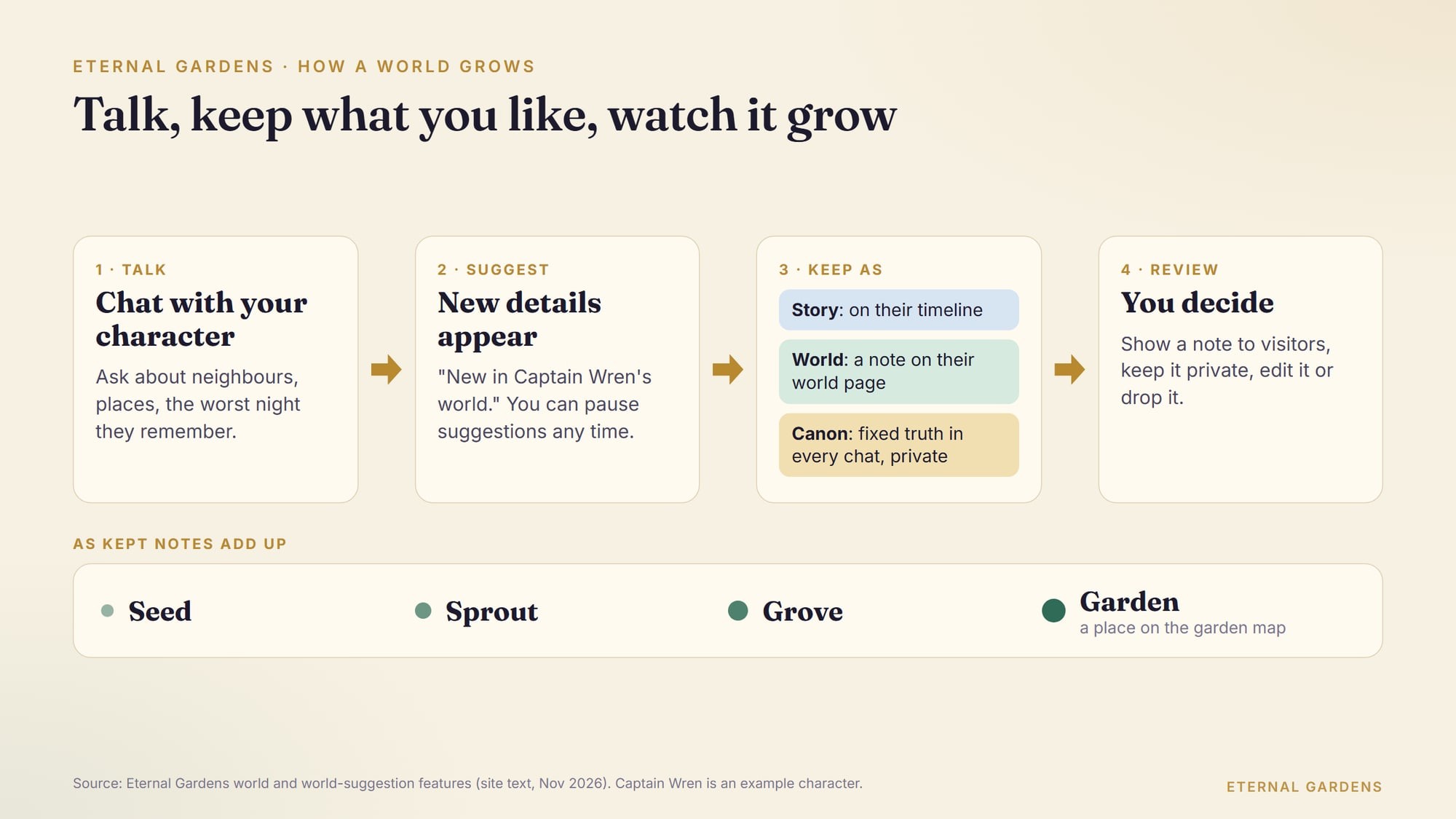
As you talk, the site can suggest new details for the world, under a heading such as "New in Captain Wren's world." You choose where each one goes:
- Story adds it to the character's timeline.
- World adds it to the world notes on the character's page.
- Canon makes it fixed. In the site's words, the character "treats it as fixed truth in every chat." Canon stays private.
You can undo a choice, or pause suggestions for that character.
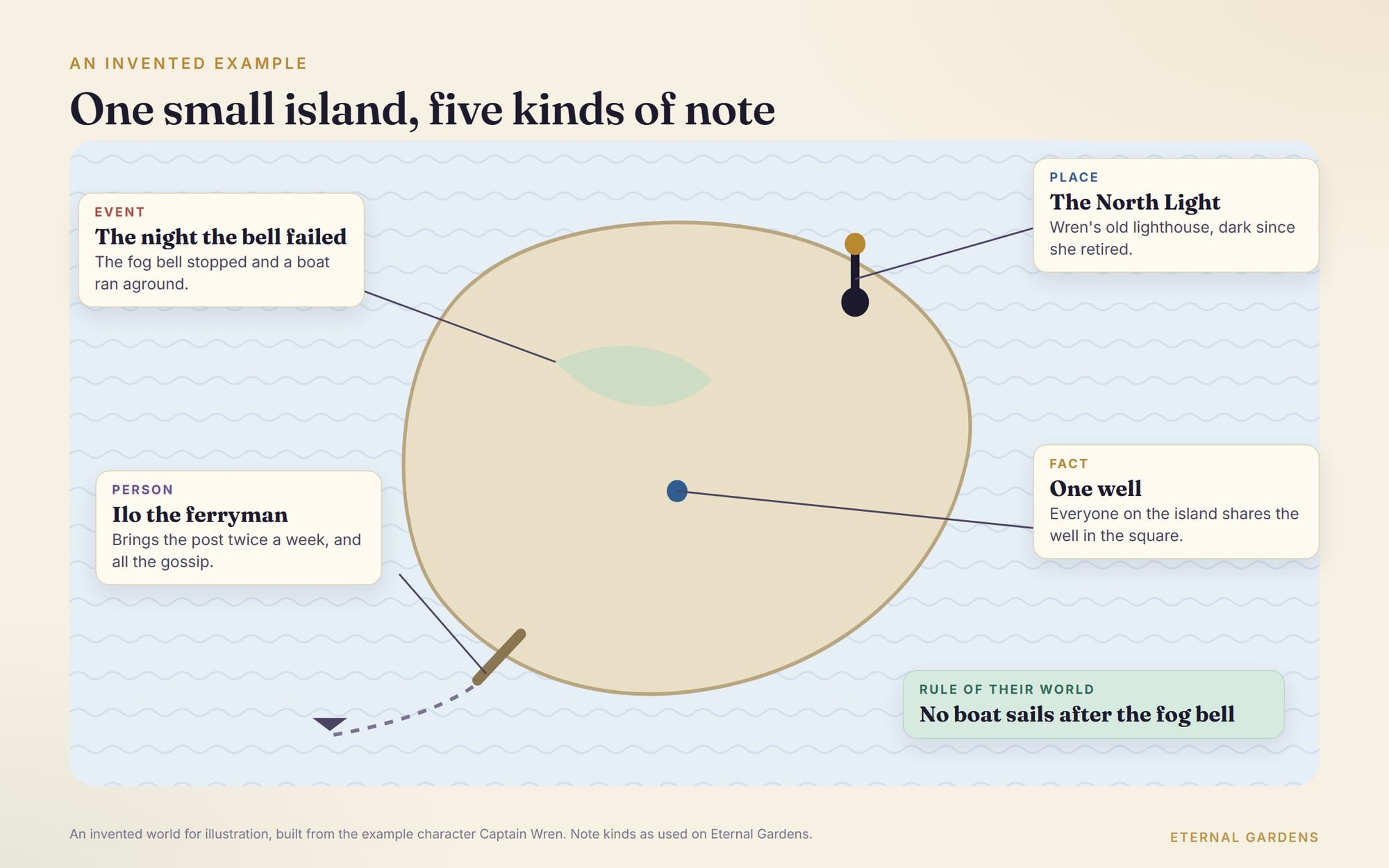
Here is how that might look in a first session. Say you ask Captain Wren who brings the post to the island. If her answer names a ferryman, he is a person worth keeping, so you keep him as a World note. If she mentions that the ferry never sails after the fog bell, that is a rule. Make it Canon, so it holds in every later chat. A passing remark about her breakfast can stay in the chat. A world with fewer, firmer facts is easier for the AI to respect.
3. Review and add notes
Each kept detail is a note. A note can be a person, a place, an event, a fact, or a "rule of their world." You can also add notes by hand. The form asks for a name, "a place, a person, a moment," and an optional line on why it matters.
Notes wait for your review. You can show a note to visitors or keep it private. You can also edit a note or drop it. Private notes still count. As the form says, "Private notes still shape the world for you."
4. Watch it grow, then publish
As you keep notes, the world moves through four stages: Seed, Sprout, Grove and Garden. When you're ready, you can give the character a page. A World page is described as "Their people, places and chapters grow as you talk. Made to explore."
Visitors read the page. They never add to it. You decide who else can add: only you, you and your stewards, or your whole circle. Only notes you keep public appear on the page.
5. Bring in other characters
A world gets richer when its people meet. You can talk with several characters at once in group chat. You can also step into scenarios, where you play a part in a scene, or read illustrated storybooks that characters live in.
Worldbuilding tips that work with AI
These habits come from fiction writing. They matter even more when your co-writer has a short memory.
Start small and local
Begin with one street or one island. Then grow outward from what the character touches every day. Sanderson warns against the opposite habit, which he calls "worldbuilder's disease": years of practising worldbuilding and too little practising the craft of writing.
Give your world rules, and limits
Sanderson's first law is about magic, but it works for any rule in a world: "An author's ability to solve conflict with magic is DIRECTLY PROPORTIONAL to how well the reader understands said magic." His second law is shorter: "Limitations > Powers."
For an AI world, that means writing rules down plainly. "No boat leaves the harbour after the fog bell" is a rule the AI can follow. "The island is mysterious" is not.
Keep a canon list
Decide which facts are fixed and which are still open. Keep the fixed ones short, one line each. On Eternal Gardens that is what the Canon choice is for. In other tools, it might be a lorebook or a pinned note.
Ask the character, not the narrator
"What do people eat on the island in March?" gets a better answer than "describe the island's food culture." Small, daily questions produce the details readers remember.
Keep the good surprises
The AI will invent things you didn't plan. Some will be better than your ideas. Keep those as notes straight away. When it contradicts your canon, correct it in the chat and check that the fact is written down.
Questions that grow a world
Good worldbuilding questions are concrete and personal. Here are some to ask any character who lives in a world:
| Area | Ask the character |
|---|---|
| Places | Where do you go when you want to be alone? What's the oldest building you know? |
| People | Who do you trust most here, and who do you avoid? |
| Daily life | What did you eat today? What does a coin buy? |
| Rules | What is forbidden here, and what happens to people who break the rule? |
| History | What do the old people still argue about? |
| Change | What's different now from when you were young? |
What can go wrong
The common problems have simple fixes.
Drift is the biggest. Facts change over a long chat because the AI no longer sees them. The fix is a canon list the AI is always shown.
Overgrowth is the second. It's tempting to add a new kingdom every session. Sanderson's advice holds: deepen what you have first.
The third is borrowing too much. It's fine to be inspired by a famous world. Building a copy of someone else's is a different thing. Eternal Gardens' own literary characters say what they are for. The Sherlock Holmes character, for example, is "built for original mysteries" and "not for recreating modern adaptations."
Try it with a character
You can practise on a world that already exists. The King Arthur character on Eternal Gardens is "grounded in Malory's public-domain Le Morte Darthur" and built for "original branching scenarios." Ask it questions a worldbuilder would ask:
- What are the unwritten rules of your court?
- Who in Camelot would you never turn your back on?
- What does a knight owe a stranger on the road?
- What happens to an oath-breaker here?
Notice which answers feel fixed and which feel invented on the spot. That difference is exactly what a canon list is for. For the history behind the legend, read our article on whether King Arthur was real. For a very different world, see our guide to Sun Wukong and Journey to the West.
When you're ready to make your own, start with one character and one sentence.
Written with AI assistance and reviewed by Eternal Gardens.
Frequently asked questions
What is AI worldbuilding?
AI worldbuilding is using a chatbot or AI character as a creative partner to invent a fictional setting: its places, people, history and rules. The AI is quick at producing ideas but poor at remembering them over a long chat, so the writer keeps the record and decides which details become fixed facts of the world.
How do I stop an AI from forgetting details of my world?
Write the important facts down somewhere the tool will show the AI again, one short line per fact. NovelAI calls this a Lorebook, other tools use pinned notes or character instructions, and on Eternal Gardens you can keep a detail as Canon, which the character treats as fixed truth in every chat. Correct contradictions as soon as you see them.
Can I build a world with an AI character for free?
On Eternal Gardens you can try a conversation free, without an account. To make your own character and grow its world, you create an account, and the site has a free plan. Check the pricing page for what each plan currently includes, since features and limits can change over time.
What are Sanderson's laws of magic?
They are three essays by the fantasy novelist Brandon Sanderson. The first says a writer can solve conflict with magic only as far as the reader understands that magic. The second says limitations are more interesting than powers. The third says to expand what you already have before adding something new, which suits AI worldbuilding well.
Who can see the world I build on Eternal Gardens?
You choose. Each note can be kept public or private, and Canon notes always stay private. Private notes still shape the world for you. If you publish a World page, visitors can read the public notes but never add to them, and you decide whether only you, you and your stewards, or your whole circle can add.
Sources
- NovelAI Documentation: Lorebookdocs.novelai.net
- Brandon Sanderson: Sanderson's First Lawbrandonsanderson.com
- Brandon Sanderson: Sanderson's Second Lawbrandonsanderson.com
- Brandon Sanderson: Sanderson's Third Law of Magicbrandonsanderson.com
- Eternal Gardens: Stories & worldseternalgardens.world
- Eternal Gardens: King Arthur charactereternalgardens.world
About the author
Eternal Gardens
Eternal Gardens is an AI character platform where you can talk with characters drawn from the writings of historical and literary figures, and build worlds and stories with them.