AI marketing tools for small business: a practical test
Compare AI marketing tools on one real task, with a printable scorecard for cost, quality, privacy and approval.
By Réson
4 min read

In this article
The best way to compare AI marketing tools for a small business is to give each one the same job. Use a real brief and public business facts. Time how long it takes to get a piece you would put your name on. Check who can publish it, what happens to the data and what you will pay after the trial.
Match AI marketing tools for small business to a real task
A writing tool helps with a first draft or a shorter caption. A design tool helps make a poster or resize a product image. A scheduling tool puts finished work on a calendar. An email tool manages a list and its sends. A visibility tool can show how an AI answer describes your business. If you need several of those jobs every week, test how the tools pass a piece from one step to the next.
A bakery with good photos and no time to write might test captions. A shop that sends one careful email a month should test its review and list workflow. Put a number on the problem before you shop. If writing takes an hour and approvals take three days, an approval step may save more time than a faster first draft.
Give every tool the same brief
Use a public service page and a product photo you own. Ask for a post and an email draft in the language your customers use. Then request a follow-up. Supply the same price and offer dates. Add a short list of words to avoid. Ask a colleague to mark each wrong fact and time how long it takes to repair the work.
If you work in English and French, test both on the same offer. Have a fluent reader check the French caption, words inside the picture and linked page. For images and music, read the licence for the plan you are testing. Check that it covers the places where you intend to use the work.
Print this scorecard
For each row, write pass or fail. Use needs work for a result your team could fix. Write down one piece of evidence next to each mark.
| Test | What to record |
|---|---|
| Ready to use | Minutes to edit, plus any wrong facts |
| Approval | Who can send, schedule or publish |
| Privacy | What the tool stores, uses and lets you delete |
| Language | Edits a fluent reviewer had to make |
| Cost | Total for your seats and expected use |
| Exit | What you can export if you leave |
Ask the vendor if it trains models on what you give the tool. Ask what is kept and which vendors handle it. Use made-up records for any test that calls for contact data. Before you send a commercial email in Canada, verify consent. Check that the message identifies the sender and gives readers a way to unsubscribe. A scheduled draft still needs your list and approval checks. See the Privacy Commissioner's business resources and CRTC guidance on consent.
Run a second test with a bad input
Give the tool a brief with a date missing. It should ask for it or leave a clear note. Now give it two dates that disagree, one on a flyer and one on a public page. Ask it to draft an event reminder. Check whether the draft shows the conflict. If it picks a date on its own, count that as an error even if it guessed right.
Do the same for tone. Ask it to write about a sold-out class without inventing a waiting list. Ask it to revise one sentence without changing the price. These small tasks show how much work you'll have to check later. A tool can write a good first draft and still add bad facts when you revise it.
Work out who owns each step
Who writes the draft? Who reviews it and can publish it? Record the names, even if two tasks go to the same person. For a two-person shop, one person might take photos and make drafts while the other confirms price and stock. For an agency, the client may need to approve a piece without signing in to the tool. Test with the people who will do that work.
Open a draft on a phone. Check that the reviewer can see the whole post, including image text and the link. Ask them to send it back with one change. Then check whether a late edit needs another approval. If the approval record matters to you, see what the tool records and whether you can export it.
Put a price on the work you can keep
Say you make eight posts and one newsletter each month. During the test, track how many tries it takes to get each image and how often you need a new draft. Count the credits used across the whole set. Check what the vendor charges for extra users and whether a new charge applies when you add a client or brand.
Use one worksheet for all the tools. Give each row a time saved or a cost added. Add the subscription cost to the credits you expect to buy. Put a value on staff time, too. If a tool keeps the brand's files in its own library, try to export them with the captions. You want to know how much work you can take with you before you buy.
Test the last step before you pay
Export the draft and its images. Ask a second person to reject a draft and send it back for edits. Check how many accounts the plan covers and whether it limits the number of files you can store. Price a normal month for your team, including the time it takes to fix the work. Decide in advance what would make you stop the trial.
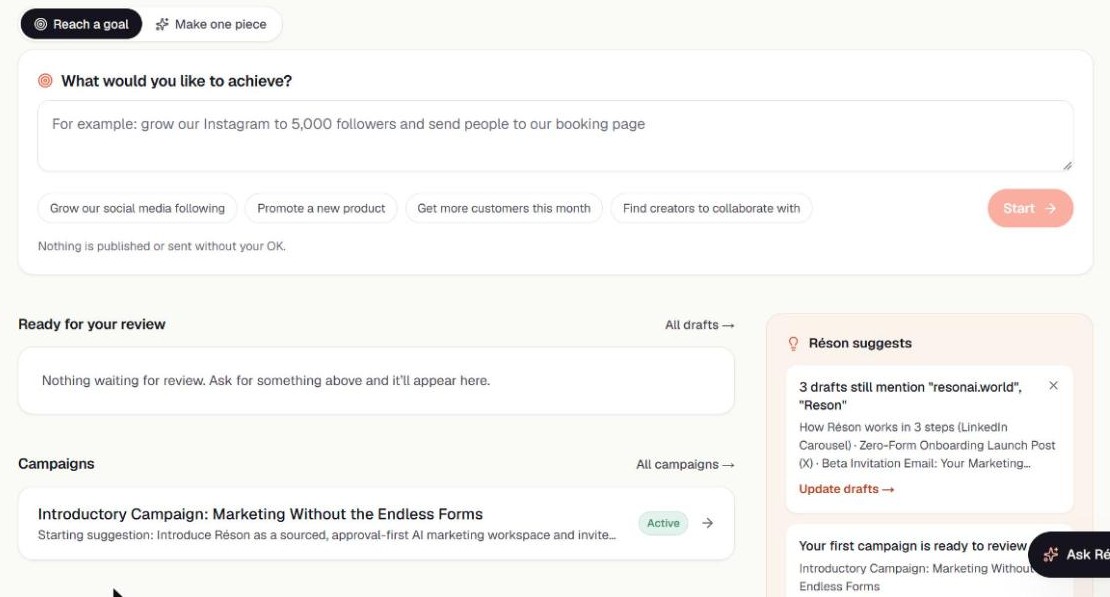
Réson is one workspace you can test. It is free during beta with a monthly generation allowance. Studio drafts marketing content, and Campaigns turns a goal into a dated plan. See what Réson includes, or use the AI content calendar example as a trial brief.
Frequently asked questions
What should I test first?
Pick a task you do often, and run the same real brief through each tool.
Do I need a suite for a two-person business?
A single tool can be enough for a single bottleneck. Test a suite if moving work among several tools takes time.
How do I compare free trials?
Estimate a normal month using the vendor's limits and track what each finished draft costs in time and credits.
Sources
- Privacy Commissioner's business resourcespriv.gc.ca
- CRTC guidance on consentcrtc.gc.ca
About the author
Réson
Réson is an AI marketing workspace for small businesses. It learns your business from your website, drafts posts, campaigns and articles, and waits for your approval before anything goes out.