AI visibility checker: how to test what AI says about your business
The questions to ask ChatGPT, Gemini, Perplexity and Google AI Mode, what to write down, and how to read the answers.
By Réson
7 min read

In this article
- What does an AI visibility checker actually check?
- How do you run an AI visibility check by hand?
- Write eight questions your customers really ask
- Ask each assistant the same way
- Record five things for every answer
- How do you read the result?
- A worked example: Réson's check of itself
- Is an AI visibility score worth tracking?
- Free checker, audit or tracker?
- What should you fix after an AI visibility check?
- How often should you check?
- Run the same check on your business
An AI visibility checker asks AI assistants the questions your customers ask, then records three things: whether your business is named, whether the facts are right, and which sources the answer used. You can run one by hand in about an hour with ChatGPT, Gemini, Perplexity and Google AI Mode. A tool does the same job faster, but the result is still a snapshot, not a grade.
This guide shows how to run the check yourself, what to write down, and how to read the answers. At the end there's a worked example: the check Réson ran on its own business in November 2026.
What does an AI visibility checker actually check?
There are two kinds of check, and most tools do one or the other. An answer check reads what an assistant says about you. A readiness check reads your website the way a crawler would, to see if an assistant could find you at all.
| Answer check | Readiness check | |
|---|---|---|
| The question it answers | What does AI say about us today? | Can AI read our site? |
| What it looks at | Assistant answers and the sources they cite | Robots.txt, titles, descriptions, headings, structured data, sitemap |
| What a good result looks like | You're named, the facts match, your own site is cited | Crawlers allowed, every page has a clear title and description |
| How often it changes | From one day to the next | Only when you change your site |
You need both. A perfect readiness score means nothing if the answer still leaves you out. And a good answer today can slip if a crawler is blocked tomorrow.
If you first need to confirm that Google has indexed a page, follow our Google website discovery checklist. It shows where to read the recorded status for a specific URL.
How do you run an AI visibility check by hand?
Write a short list of real customer questions, ask each assistant the same way, and record the same five things every time. The method matters more than the tool.
Write eight questions your customers really ask
Most people only ask "What is [my business]?" That's the easiest question, because it contains your name. The harder ones are the questions where a customer doesn't know you yet.
Mix four types. Here they are for Maison Lune, an invented bakery in Sherbrooke:
| Type | Example question |
|---|---|
| Name | "What is Maison Lune Bakery in Sherbrooke? What do they sell?" |
| Category | "Where can I buy gluten-free bread in Sherbrooke?" |
| Fact | "Is Maison Lune open on Mondays? How much is a sourdough loaf?" |
| Comparison | "Which bakeries in Sherbrooke make birthday cakes to order?" |
Write two of each, using your own town and products.
Google's guide to optimizing for generative AI features explains why the category questions matter. Its AI may use "query fan-out", running several related searches to build one answer. Its example: a question about a weedy lawn can turn into searches for "best herbicides for lawns" and "remove weeds without chemicals". Your page has to answer one of those smaller searches to be picked up.
Ask each assistant the same way
Use the four assistants named above. In ChatGPT, make sure search is on, so the answer shows its sources. Start a fresh chat for each question, so an earlier answer doesn't steer the next one. Paste the question exactly as written. Note the date, because answers change.
If you have a physical location, ask from your own area and also add the town to the question. A customer in the next town over may get a different list.
Record five things for every answer
Keep a simple sheet, one row per answer, with these columns:
- Were you named? Note "only by name" if you appeared only when the question used your name.
- The statements that match your own site.
- The statements that contradict it, such as old hours or a service you dropped.
- The important facts it left out.
- The pages it cited, and whether one of them is yours.
Add a sixth column if you like: who it named instead. That tells you whose page answered the question better.
How do you read the result?
Read it claim by claim, not as a single score. Split each answer into separate statements and mark each one as matching, wrong, not on your site, or too vague to check.
A "not on your site" statement isn't always an error. The assistant may have found a true fact somewhere else, such as a directory listing. But if you can't confirm it, a customer can't either. Either add the fact to your own site or correct the place it came from.
The "left out" list is often the most useful part. Errors are easy to spot. Gaps are not, because the answer reads fine. Ask yourself: if a customer read only this answer, what would they not know that you'd want them to know?
A worked example: Réson's check of itself
On 5 November 2026, Réson ran its own AI check on itself. It asked a search-connected AI: "What is Réson? What do they offer, who is it for, and how do I contact them?"
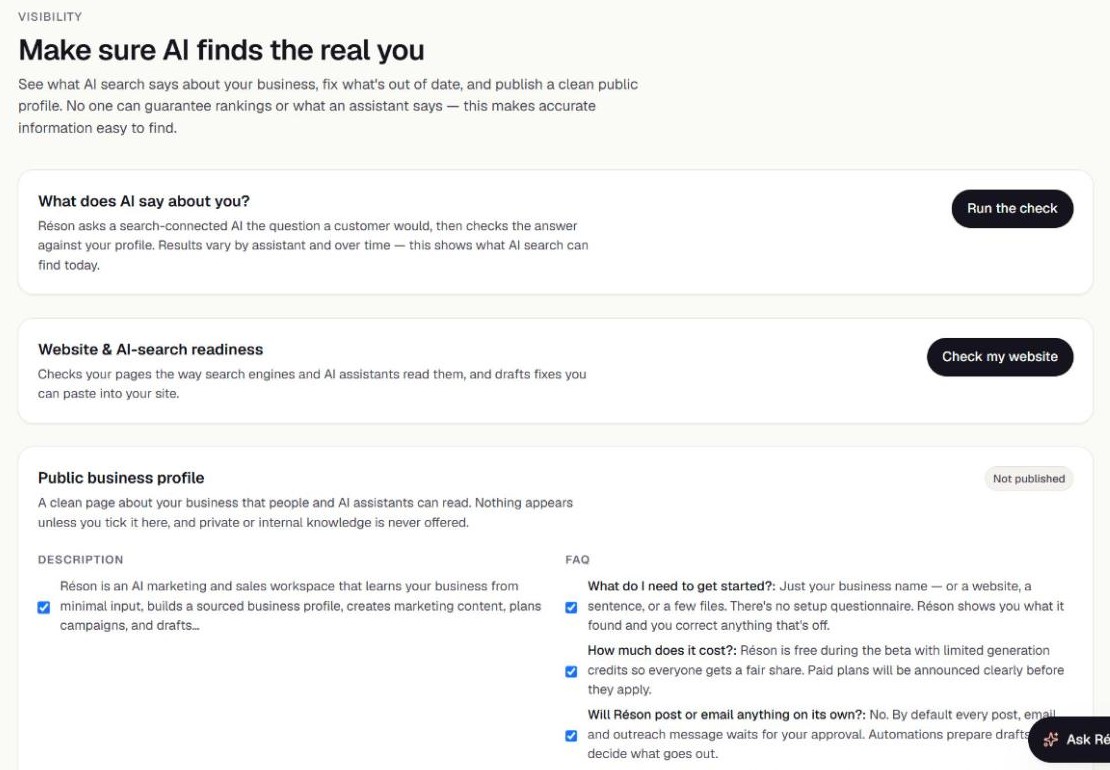
The answer was rated Accurate. It got the core features right, and the rule that nothing goes out without the owner's approval. But it added two contact details the profile didn't confirm: demo and contact forms, and a privacy email. And it left out five things, including the fact that Réson is free during the beta.
The fix was small. Réson put "free during the beta" into its home page description, so the fact sits where crawlers look first. An accurate answer can still be incomplete, and the gaps are where the work is.
Is an AI visibility score worth tracking?
A score is only as good as the questions behind it. Treat any single number as a rough guide, and track the answers and sources instead.
Many tools give a score out of 100. Ask how it's made: which assistants, which questions, how many runs. The same question can get a different answer tomorrow. Google is blunt about outside tools: "No third-party tool has access to our internal ranking or AI systems."
Two free reports give you real data from the search engines themselves, as of November 2026:
- Google Search Console has a Generative AI performance report. It counts impressions: "how many times links to your site were shown to a user in a generative AI feature on Google Search." It covers AI Overviews and AI Mode. Google says it reached all websites worldwide by 31 August 2026, though a site with very few impressions may not see it.
- Bing Webmaster Tools has AI Performance, in public preview since February 2026. It counts citations across "Microsoft Copilot, AI-generated summaries in Bing, and select partner integrations," and shows which of your pages were cited.
Neither report covers ChatGPT or Perplexity. For those, your hand-run sheet is still the best record you have.
Free checker, audit or tracker?
The names overlap, but they point to three different jobs. A free checker is usually a one-off: you type your site and get a quick report. An audit goes deeper, reading many questions and many pages, and ends in a list of fixes. A tracker reruns the same questions on a schedule and charts the change.
Start with the free, one-off kind, by hand or with a tool. You only need a tracker once you're making changes and want to see if they worked. Before you pay for one, ask the seller which assistants it queries, how often, and whether you can read the full answers rather than just a score.
What should you fix after an AI visibility check?
Fix the cause, not the answer. You can't edit what an assistant says, but you can change what it reads.
| What you saw | A likely cause | What to try |
|---|---|---|
| Not named for category questions | Your pages don't say what you sell, where, in plain words | Put your category and town in your home page's first sentence |
| Old hours or prices | An old page, PDF or listing still says the old thing | Update or remove the old source too |
| A fact left out | It's on your site, but buried or only in an image | Move it into text near the top of a page |
| Never cited, even when named | Crawlers may be blocked | Check robots.txt and any firewall or bot blocker |
| A competitor named instead | Their page answers the question and yours doesn't | Write the page you're missing |
For the crawler check, open yourdomain.com/robots.txt. The bots to look for are OpenAI's OAI-SearchBot, which OpenAI says is "used to surface websites in search results in ChatGPT's search features", plus PerplexityBot and Anthropic's Claude-SearchBot. Our guide on how to get your business cited by ChatGPT goes through each fix in order.
Beware of quick tricks. The research behind generative engine optimization found that stuffing pages with keywords did worse than leaving them alone. For Google's AI answers in particular, see how to rank in Google AI Overviews.
How often should you check?
Once a month is enough for most small businesses. Use the same questions each time, so you compare like with like.
After a big change, such as a new website, check again in a week or two. OpenAI says robots.txt changes can take about 24 hours to reach ChatGPT search, and an assistant may not reread your pages straight away. Keep old sheets. Three months of rows will tell you more than any single run.
Run the same check on your business
If you'd rather not do it all by hand, Réson's Visibility page runs both checks. The AI check asks a search-connected AI the same kind of question shown above and compares the answer with your business profile, claim by claim. The website check reads up to six pages and reports titles, descriptions, headings, schema.org data, the sitemap and whether robots.txt lets five AI crawlers in. You can try Réson free during the beta.
Whichever way you run it, read the "left out" list first, fix one thing, and ask the same questions again next month. As Réson's own screen puts it: "No one can guarantee rankings or what an assistant says."
Frequently asked questions
What is an AI visibility checker?
It is a check, by hand or with a tool, of what AI assistants say about your business. It asks the questions customers ask, then records whether you are named, whether the facts match your own site, what was left out and which sources were cited. Some tools also check whether your website lets AI crawlers in.
Is there a free AI visibility checker?
Yes. You can run one yourself for free by asking ChatGPT, Gemini, Perplexity and Google AI Mode a set of customer questions and recording the answers. Google Search Console's Generative AI performance report and Bing Webmaster Tools' AI Performance report are also free, and they show real impressions or citations from those search engines.
How accurate is an AI visibility score?
Treat it as a rough guide. A score depends on which questions were asked, which assistants and how many times, and the same question can get a different answer the next day. Google says no third-party tool has access to its internal ranking or AI systems. Reading the answers claim by claim tells you more than the number.
How often should I check my AI visibility?
Once a month suits most small businesses, using the same questions each time so results are comparable. Check again a week or two after a big change such as new hours, prices or a new website. OpenAI says robots.txt changes can take about 24 hours to reach ChatGPT search.
Sources
- Google Search Central: Optimizing your website for generative AI features on Google Searchdevelopers.google.com
- Search Console Help: Generative AI performance reportsupport.google.com
- Bing Webmaster Blog: Introducing AI Performance in Bing Webmaster Tools Public Previewblogs.bing.com
- OpenAI: Overview of OpenAI Crawlersdevelopers.openai.com
- Perplexity: Perplexity Crawlersdocs.perplexity.ai
- Anthropic: Does Anthropic crawl data from the web, and how can site owners block the crawler?support.claude.com
About the author
Réson
Réson is an AI marketing workspace for small businesses. It learns your business from your website, drafts posts, campaigns and articles, and waits for your approval before anything goes out.