How to rank in Google AI Overviews: a small-business guide
What Google tells site owners about AI Overviews and AI Mode, what you control, and what local businesses should fix first.
By Réson
7 min read

In this article
- What are Google's AI answers?
- Can you rank in Google AI Overviews?
- What Google asks site owners to do
- Write the page that answers the question
- How do local businesses show up in AI answers?
- What you can switch off, and what doesn't work
- How can you tell if AI Overviews send you visitors?
- What to do when an AI Overview gets your business wrong
- Run the same check on your business
There is no separate ranking to win in Google AI Overviews. Google says a page only has to be indexed and eligible to show with a snippet, with no extra requirements. So how to rank in Google AI Overviews comes down to search basics. Let Google read your site, answer real questions clearly and keep your Business Profile current.
That is less exciting than a secret trick, but it is good news for a small business. You don't need a budget or a special file. You need pages that say what you do in words, and a profile that matches them.
This guide sticks to what Google has published for site owners. Where Google says nothing, we say so.
What are Google's AI answers?
AI Overviews are the AI-written summaries that appear in some Google results, with links to the pages they drew on. AI Mode is a separate, conversational search for harder questions and comparisons.
Google's guide to AI features and your website says AI Overviews help people "get to the gist of a complicated topic or question more quickly". AI Mode is meant for questions where "further exploration, reasoning, or complex comparisons are needed".
Both may use what Google calls "query fan-out": "issuing multiple related searches across subtopics and data sources" to build one answer. A question like "best place for a gluten-free birthday cake in Laval" might set off one search about bakeries and another about gluten-free baking. Your page can be picked up by either.
Two more facts help set your expectations. AI Overviews "often don't trigger", because Google only shows them when it judges they add something. And AI Mode and AI Overviews may use different models, so the links they show will vary. As of November 2026, Google's AI Overviews help page lists Canada among the places they appear. English and French are both on its list of languages.
Can you rank in Google AI Overviews?
Not in the usual sense. Google says "there are no additional requirements to appear in AI Overviews or AI Mode, nor other special optimizations necessary." A page has to be indexed and able to show with a snippet. After that, Google decides which pages to link.
The same page adds: "Indexing and serving isn't guaranteed." Search Console's own rules confirm there is no order inside the box. Its Performance report help says an AI Overview "occupies a single position in search results, and all links in the AI Overview are assigned that same position."
So drop the idea of climbing from third link to first. The useful question is simpler: when someone asks about what you sell, is your page a clear, trustworthy answer? Some sellers call this work generative engine optimization. Our plain guide to GEO looks at what the research behind that term actually tested.
What Google asks site owners to do
Google's list is short, and none of it is new. Here it is, with the small-business version of each point.
| Google's best practice | What it means for a small business |
|---|---|
| Crawling allowed in robots.txt "and by any CDN or hosting infrastructure" | Open yourdomain.com/robots.txt. Ask your host whether a bot blocker is on. |
| Content easy to find through internal links | Link your service pages from the home page and menu. |
| A great page experience | The page loads fast and reads well on a phone. |
| Important content in text form | Prices, hours and services typed out, not only in a photo or PDF. |
| Good images and videos | Real photos of your work, with alt text. |
| Structured data that matches the visible text | If your schema says you open at 9, the page says 9 too. |
| Merchant Center and Business Profile up to date | Same hours, phone and address everywhere. |
Google is just as clear about what you can skip. "You don't need to create new machine readable files, AI text files, or markup to appear in these features. There's also no special schema.org structured data that you need to add." If someone sells you an "AI Overviews file", that sentence is worth showing them.
Write the page that answers the question
People ask longer questions in AI search. Google's Search Central blog said in May 2025 that people in its AI search are "asking longer and more specific questions". Its advice was to make "unique, non-commodity content".
For a plumber, that might be a page on "what a water heater swap costs in Sherbrooke and how long it takes". For a café, it might be your allergy policy in plain words. Write what only you know. Put down your prices and your service area. Then answer the questions customers ask you on the phone.
How do local businesses show up in AI answers?
For a local search, Google leans on the Business Profile as well as your site. Keep that profile complete and true, and make it match your website.
Google's help page on local ranking names three factors. Relevance is how well your profile matches the search. Distance is how far you are from the person searching. Prominence is how well known you are, based on things like "how many websites link to your business and how many reviews you have."
The same page is blunt about shortcuts: "There's no way to request or pay for a better local ranking on Google."
Your profile is also not only what you typed. Google compiles profiles from several places. These include crawled web content such as your own site, licensed data from other companies, and what users add, such as photos and reviews. So an old error can be hard to shake when it comes from a source you don't control.
Here is what to do this month:
- Verify the profile, if you haven't.
- Check the category and address, then the hours, including special holiday hours.
- Add attributes such as parking or Wi-Fi.
- Reply to recent reviews, good and bad.
- Add a few current photos.
- Make sure your site says the same things in text.
For a deeper local checklist written for Québec, see our guide to local SEO in Québec.
What you can switch off, and what doesn't work
Some owners want less of their text in AI answers, not more. Google gives you page controls for that, and they are the same ones used for ordinary snippets.
Google's robots meta tag guide says nosnippet covers AI Overviews and AI Mode. It "will also prevent the content from being used as a direct input" for them. max-snippet limits how much text can be used. data-nosnippet hides one part of a page, such as a price list you change often. noindex keeps the page out of Search entirely.
One common mistake is blocking Google-Extended and expecting it to remove you from AI Overviews. Google's crawler documentation says Google-Extended covers training and grounding for Gemini apps and Vertex AI. It "does not impact a site's inclusion in Google Search nor is it used as a ranking signal". For AI features in Search, the control is Googlebot.
Changes are not instant. Google says recrawling "can take anywhere from several days to several months".
How can you tell if AI Overviews send you visitors?
Look in Google Search Console. Clicks from AI Overviews and AI Mode are counted in the Performance report, under the "Web" search type, together with your other search traffic.
Google's guide doesn't describe a separate filter for AI features, so expect those numbers to be mixed in with the rest. A click on a link in an AI Overview counts as a click. A follow-up question in AI Mode counts as a new search.
Google also says that clicks from results pages with AI Overviews "are higher quality (meaning, users are more likely to spend more time on the site)". That is Google's claim, and the page shares no numbers. Check it against your own results, such as calls and bookings. The May 2025 post suggests watching "information lookups about your business" too.
What to do when an AI Overview gets your business wrong
Google's help page warns that "AI responses may include mistakes." If an overview says something wrong about you, you have three moves.
First, use the thumbs-down button under the overview and choose "Report a problem". Second, find the source. Click the links in the overview and fix what you control: your own page, your Business Profile, or a listing you can edit. If the Business Profile has an error you can't change directly, suggest an edit. Third, write the correct fact plainly on your site, in text, where a crawler can read it.
Then wait, and search again in a few weeks. For a wider look at checking what different assistants say, read our guide to running an AI visibility check. ChatGPT uses its own crawler, so see how to get your business cited by ChatGPT for that side.
Run the same check on your business
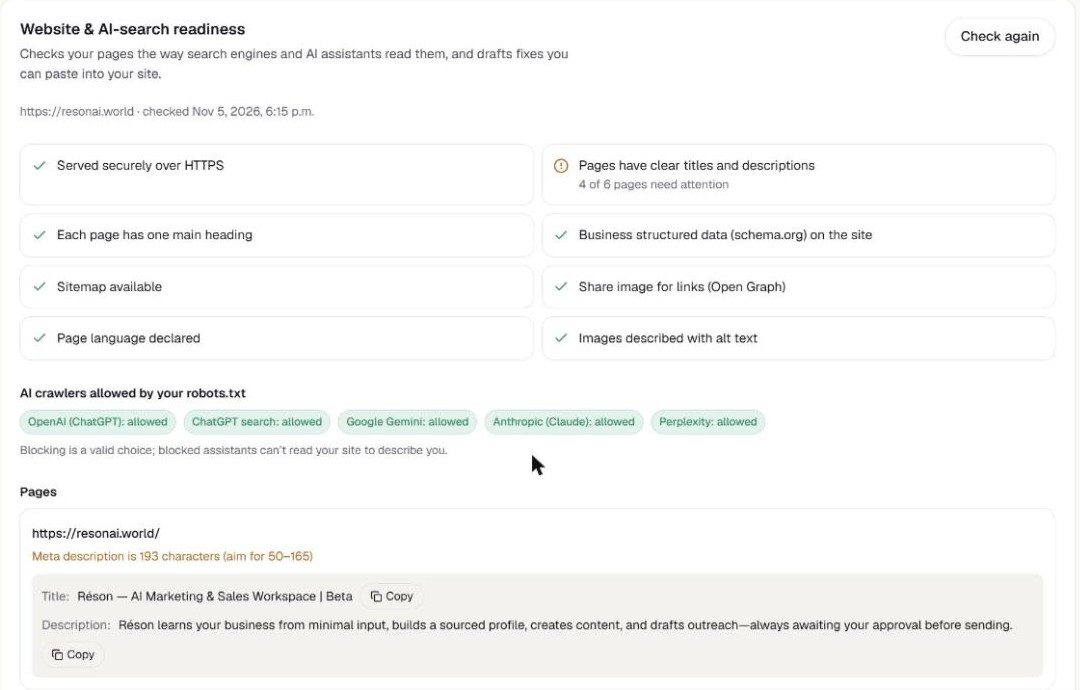
We ran Réson's website check on our own site on 5 November 2026. Most things passed, from HTTPS to schema.org data, and no AI crawler was blocked. But 4 of 6 pages had titles or descriptions out of range. The home description was 193 characters, against an aim of 50 to 165.
A separate AI check had also shown that the AI answer left out that Réson is free during the beta. So we cut every marketing description to 160 characters or less, and put "free during the beta" in the home description.
You can do the same by hand with the checklist above, or run the website check in Réson, which is free during the beta. Either way, fix the page with the weakest title and description first. No one can guarantee rankings or what an assistant says. You can make sure Google has a clear, correct page to read.
Frequently asked questions
Can I pay to appear in Google AI Overviews?
Google doesn't describe any paid route into the AI-written answer. Its guide says there are no additional requirements or special optimizations needed to appear in AI Overviews or AI Mode. For local results, its Business Profile help adds that there's no way to request or pay for a better local ranking.
Do I need special schema or an llms.txt file for AI Overviews?
No. Google's AI features guide says you don't need new machine-readable files, AI text files or markup, and there's no special schema.org structured data to add. Ordinary structured data can still help regular search features. If you use it, Google asks that it matches the visible text on the page, so your hours and prices should agree in both places.
Does blocking Google-Extended remove my site from AI Overviews?
No. Google's crawler documentation says Google-Extended manages training and grounding for Gemini apps and Vertex AI, and does not affect inclusion in Google Search or act as a ranking signal. To limit how your text is used in AI Overviews and AI Mode, Google points to nosnippet, data-nosnippet, max-snippet or noindex, and to robots.txt rules for Googlebot.
How do I see AI Overviews traffic in Search Console?
Open the Performance report and keep the search type on Web. Google counts clicks from AI Overviews and AI Mode there, mixed in with your other search traffic. The guide doesn't describe a separate AI filter. A click on a link inside an AI Overview counts as a click, and every link in one overview shares the same position.
What should I do if an AI Overview is wrong about my business?
Use the thumbs-down button under the overview and report the problem. Then open the links it used and fix what you control, such as your own page or your Business Profile, and suggest an edit for profile errors you can't change directly. Write the correct fact in plain text on your website, then check again after Google recrawls.
Sources
- Google Search Central: AI features and your websitedevelopers.google.com
- Google Search Central: Robots meta tag, data-nosnippet and X-Robots-Tag specificationsdevelopers.google.com
- Google: Google's common crawlers (Google-Extended)developers.google.com
- Search Console Help: Performance report (AI Overviews and AI Mode)support.google.com
- Google Search Help: AI Overviewssupport.google.com
- Google Business Profile Help: Tips to improve your local ranking on Googlesupport.google.com
- Google Business Profile Help: How Google sources info in Business Profilessupport.google.com
- Google Search Central Blog: Top ways to ensure your content performs well in Google's AI experiences on Search (21 May 2025)developers.google.com
About the author
Réson
Réson is an AI marketing workspace for small businesses. It learns your business from your website, drafts posts, campaigns and articles, and waits for your approval before anything goes out.