Small business newsletter with AI: how to start one in Canada
Consent-first list building under CASL, a monthly template, AI drafts that sound like you, and numbers you can trust.
By Réson
8 min read
In this article
- What do you need before the first issue goes out?
- The setup list
- Who are you allowed to email under CASL?
- What should a small business newsletter say?
- A monthly newsletter template you can reuse
- How do you write a small business newsletter with AI that doesn't sound generic?
- How should you measure opens and clicks honestly?
- Try this workflow in Réson
To start a small business newsletter with AI, first collect addresses from people who agreed to hear from you. Pick an email service that handles sign-ups and unsubscribes, and choose a pace you can keep, such as once a month. Let AI draft each issue from your own notes. Then edit and check it before you press send.
The AI part is the easy part. The hard parts are the list and the habit. This guide is written for businesses in Canada, where Canada's Anti-Spam Legislation (CASL) sets the rules for commercial email. It explains consent in plain words and gives you a monthly template. It also shows how to keep AI drafts from sounding like everyone else's, and how to read your results without fooling yourself. It is general information, not legal advice.
What do you need before the first issue goes out?
You need an email service, a clear sign-up form, a record of who agreed, and a footer with an unsubscribe link. Set up email authentication too. Everything else can wait.
The setup list
- An email service provider. This is the tool that stores your list and sends each issue. It also handles unsubscribes for you. Don't send a newsletter from your normal inbox in BCC.
- A sign-up form with one field for the email address. Add one sentence that says what people will get and how often.
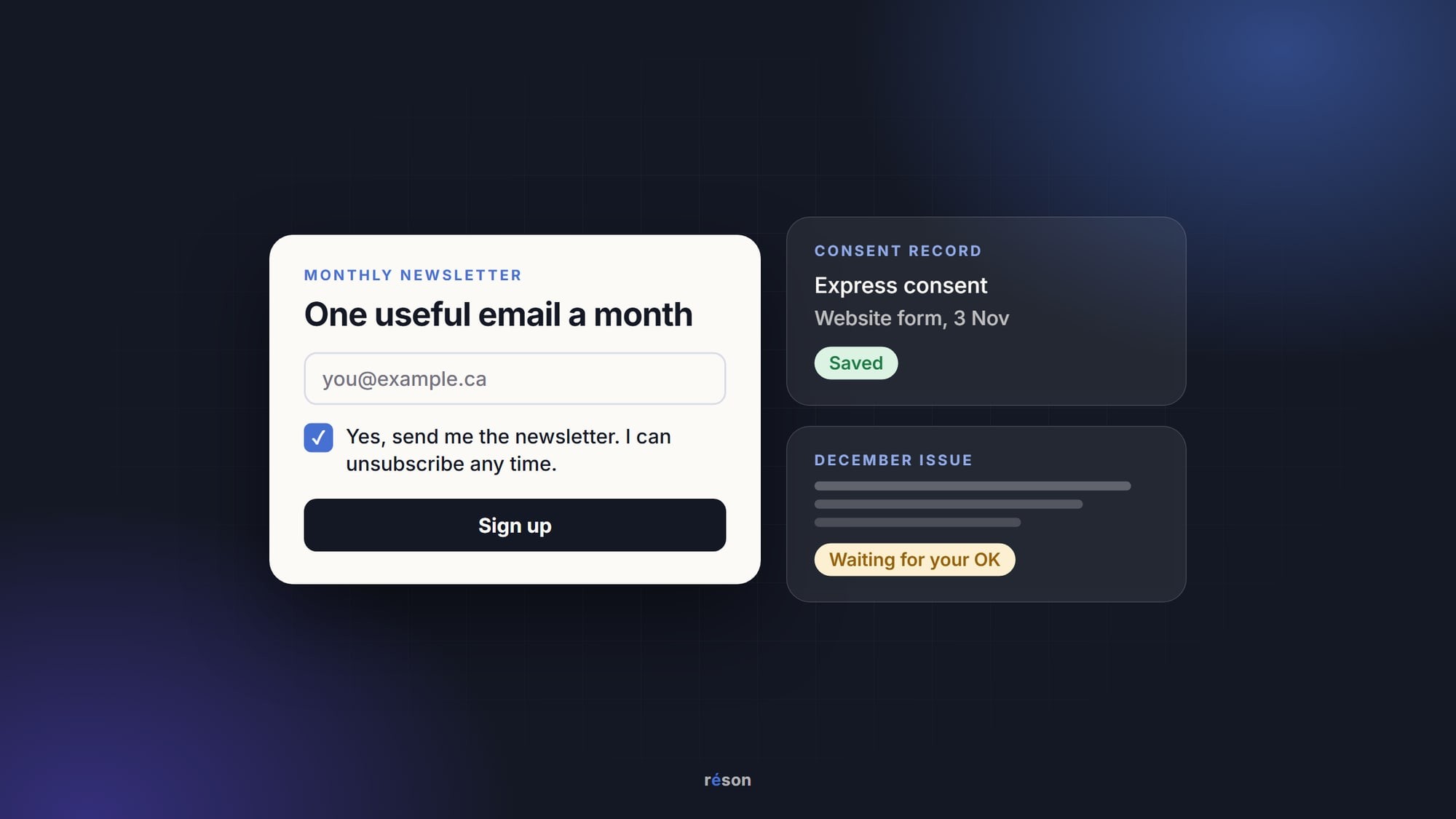
- A consent record. Check that your email service logs when and where each person signed up. Save a copy of the form's wording as well.
- A footer with your business name and mailing address. Add one more way to reach you, plus the unsubscribe link.
- Email authentication. Ask your email service to walk you through SPF and DKIM for your domain. Since February 2024, Google's email sender guidelines have required one of the two from anyone who sends to Gmail accounts.
Examples of email services, as of November 2026, include Mailchimp (an email and SMS marketing platform with a free plan). Another is Cyberimpact, an email marketing platform that says it stores contact data on Canadian servers. Some email services have AI writing built in; Mailchimp's home page, for one, lists generative AI features. A general chatbot works for drafts too, as long as you paste the result into the service that sends it.
Finally, write three issue ideas before you send the first one. If you can't think of three, a newsletter may not be the right channel yet.
Who are you allowed to email under CASL?
Under CASL, you can send a commercial email only to people who gave you express consent, or whose consent the law implies for a limited time. A newsletter that promotes what you sell is almost always commercial. The Act itself covers any message where one purpose is to "encourage participation in a commercial activity."
There are two kinds of consent. The federal government's page on getting consent to send emails defines express consent simply: someone "has agreed (verbally or in writing)" to receive your messages. It has no time limit unless they withdraw it. Implied consent comes from a relationship, and section 10 of the Act gives it an end date. A purchase counts for two years. An inquiry counts for six months.
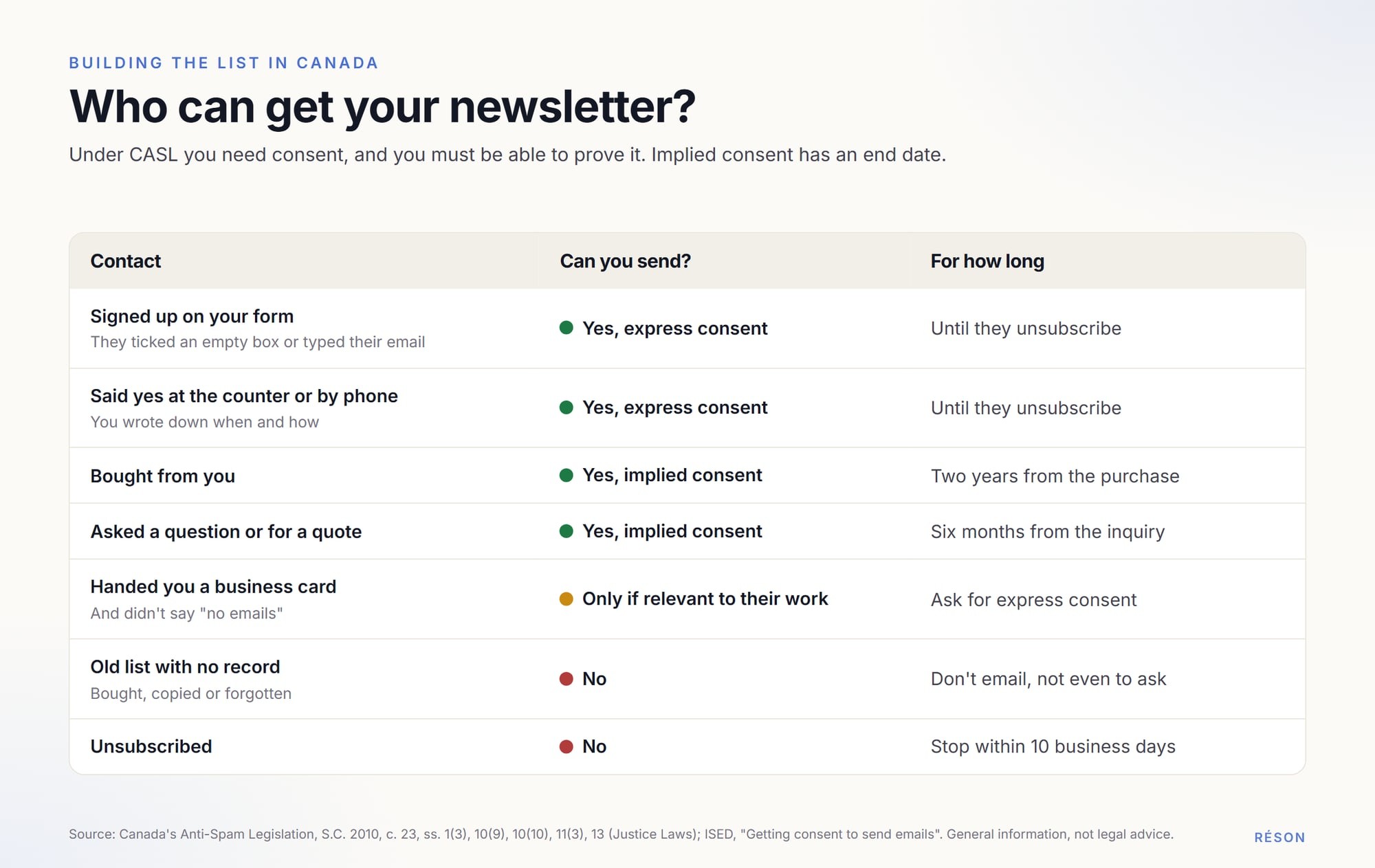
Three rules catch small businesses most often.
First, asking for consent by email counts as a commercial email. Section 1(3) of the Act says so. You can't email an old contact list to ask "Do you want our newsletter?" if you have no consent for those people.
Second, the request must be clear. The CRTC's regulations say a consent request names who is asking, with a mailing address plus another contact method, and says that people can withdraw consent. The Act adds that it must state what the consent is for. Leave the sign-up box unticked, so the person makes the choice.
Third, you must be able to prove consent. Section 13 puts that burden on the sender. The CRTC's advisory on keeping records of consent lists what to keep. The list runs from completed online forms to every unsubscribe request and what you did about it.
Implied consent runs out, so build your newsletter list on express consent. Ask at the counter and on receipts. Add a sign-up line to booking confirmations and to your website. For footer details and the full pre-send routine, use our CASL compliance checklist for small businesses. If you sell in Québec, the French guide to la LCAP, les courriels et la Loi 25 adds the provincial privacy side.
What should a small business newsletter say?
Send one useful thing per issue that a customer can act on this month. A newsletter earns its place when it tells people something they didn't know, like a new product or a fix for a common problem.
Good material is already in your week:
- the question customers asked most this month, answered properly
- a new or seasonal item (give the price and start date)
- a short how-to tied to what you sell, such as how to store sourdough
- a photo from behind the counter with two lines of story
- holiday hours or a closing, with exact dates
- one offer, if you have one, with its end date
Skip the "here are all our posts from this month" issue. People who follow you have seen them already.
How often should you send? Pick the pace you could keep in your busiest month. For many small businesses that is once a month. Twelve issues a year on time beat four bursts and a long silence.
A monthly newsletter template you can reuse
Use the same shape every month. Writing gets faster, and readers learn where to look. The template below fits on a phone screen plus a short scroll.
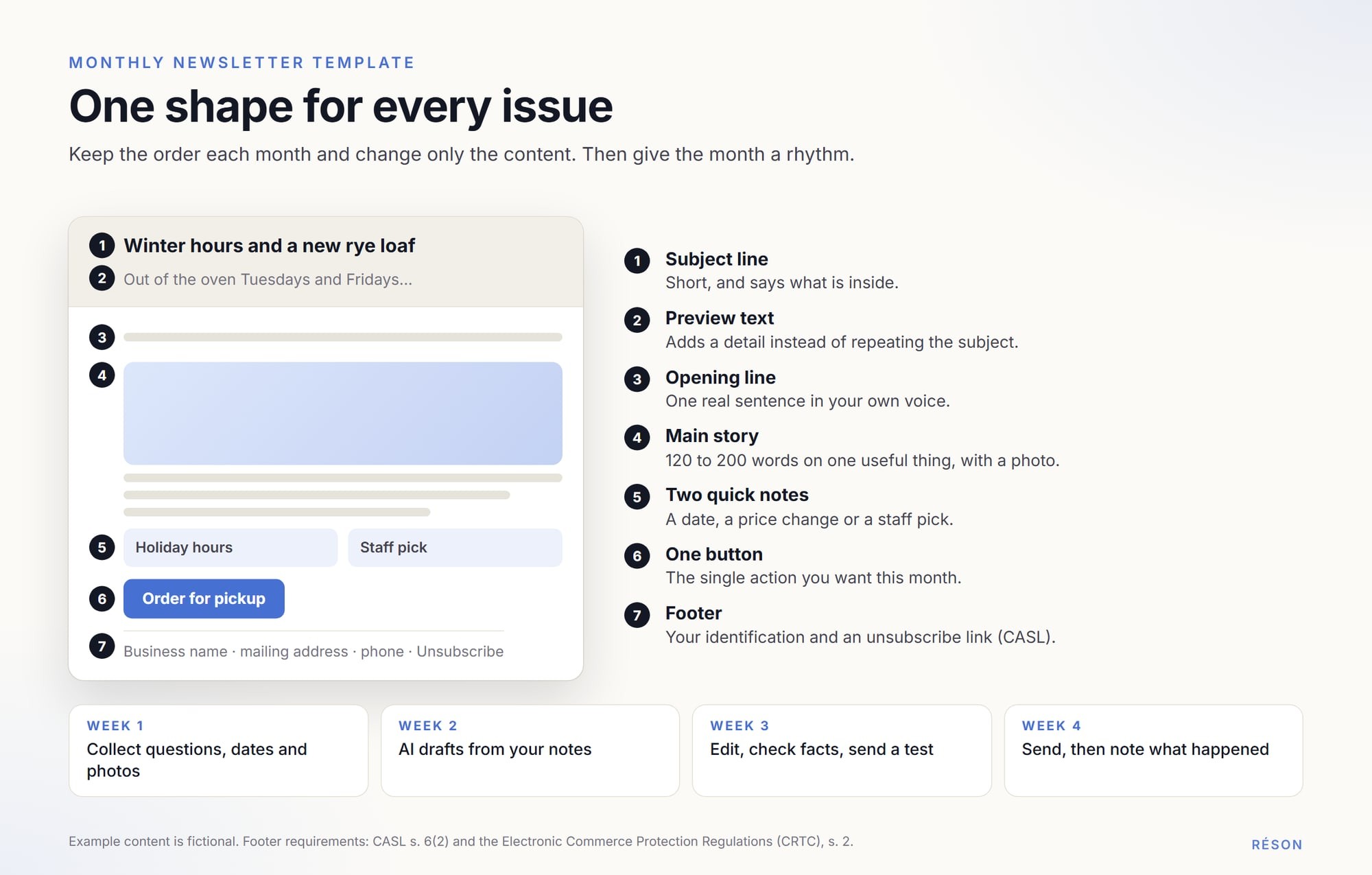
- Subject line: short enough to read on a phone, and it says what is inside. "Winter hours and a new rye loaf" beats "November news."
- Preview text: the line most inboxes show after the subject. Use it to add a detail, not to repeat the subject.
- Opening line: one sentence in your voice about something real.
- Main story: 120 to 200 words on the one useful thing, with a photo.
- Two quick notes: short items such as a date or a staff pick.
- One button: the single action you want, such as Book now.
- Footer: your CASL details and the unsubscribe link, the same every time.
Then give the month a rhythm. In week one, keep a running note of customer questions and coming dates, with photos. In week two, have AI draft from that note. In week three, edit the draft and check every fact. Send a test to yourself. Send the real thing in week four and write down what happened. Our AI content calendar guide shows how to fit the newsletter into your posting plan.
How do you write a small business newsletter with AI that doesn't sound generic?
Give the AI material only you have and tell it to use nothing else. Then edit as if a regular customer were reading over your shoulder. Generic drafts come from generic prompts: a chatbot asked for "a November newsletter for a bakery" can only guess.
Start with a short fact sheet: what you sell and what it costs, plus your hours. Add notes on your tone and the words you never use. Our guide to building a business knowledge pack shows what goes in one. Then paste in the month's notes and ask for something like this:
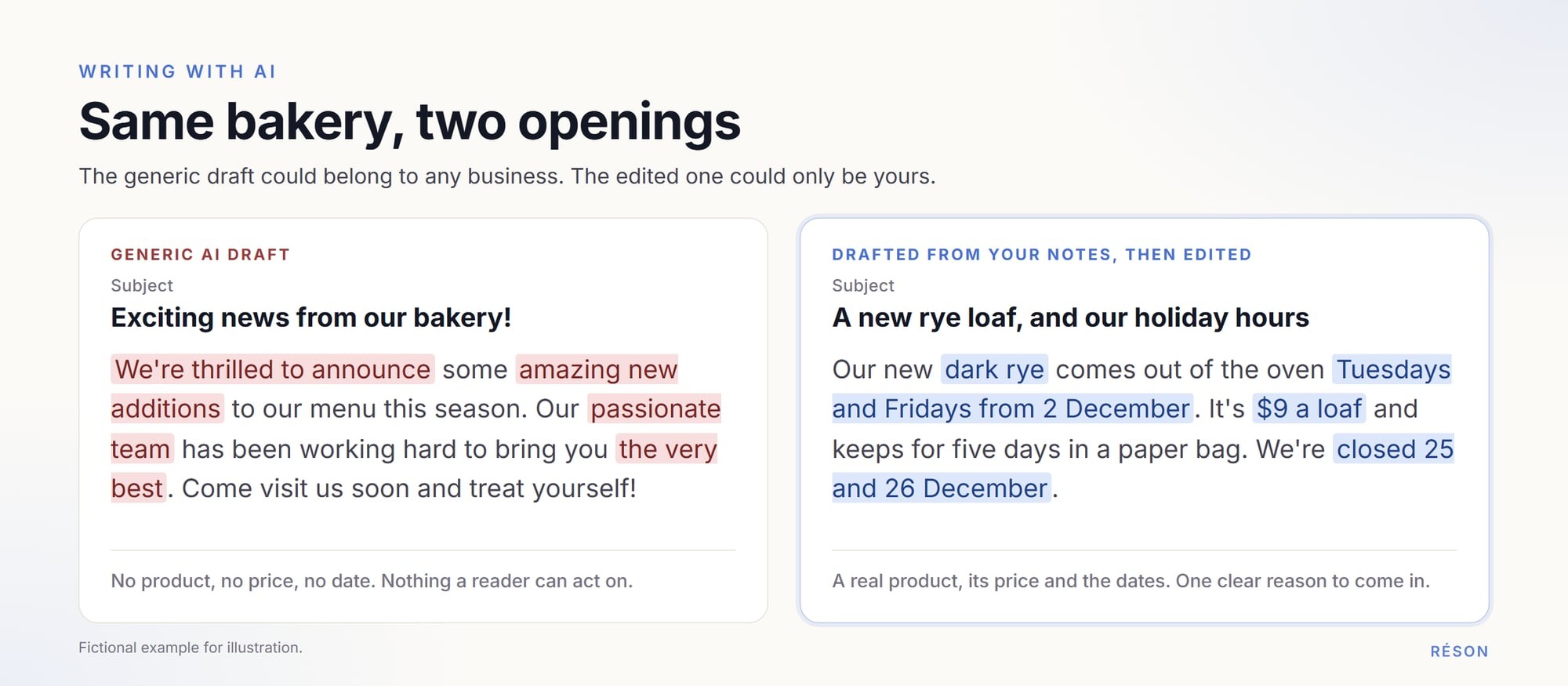
When the draft comes back, do one edit pass:
- Check each price and date against your own records.
- Cut phrases you would never say out loud, like "we're thrilled to announce."
- Add one detail only someone inside the business would know.
- Read it aloud. If it sounds like an advert, rewrite the opening line yourself.
- Pick the most honest subject line, not the cleverest one.
AI helps after the draft too. Ask it to shorten a paragraph or suggest a clearer button label. It can also produce a first French version, which a fluent reader should then check.
How should you measure opens and clicks honestly?
Treat open rates as a rough signal. Judge each issue by clicks and replies, and better still by what people did next. Some mail apps now hide opens from senders.
Apple's page on Mail Privacy Protection says the feature "prevents senders from seeing if you've opened the email message they sent you." For readers who use it, your open figures can't show what they really did. Apple adds that the protection does not cover links, so clicks remain a better guide.
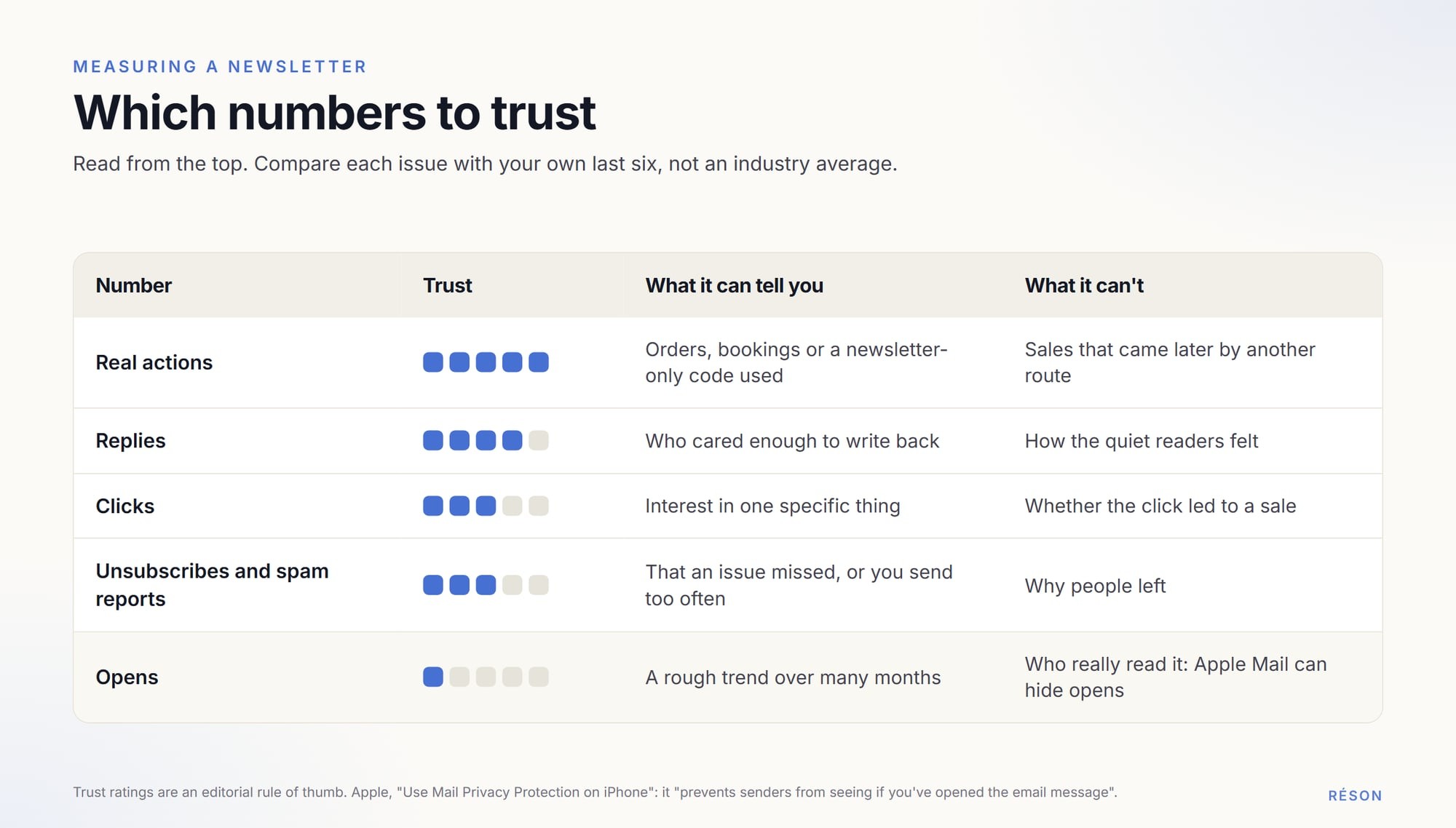
Here is what to watch, roughly in order of trust:
| Number | What it tells you | How to use it |
|---|---|---|
| Real actions | Orders or bookings that follow the send | The best test. Use a code or link that only the newsletter has. |
| Replies | People cared enough to write back | Ask one question per issue and count the answers. |
| Clicks | Interest in one specific thing | Compare the button's clicks from issue to issue. |
| Unsubscribes and spam reports | The issue missed, or you send too often | A jump after one issue is worth a look. |
| Opens | A rough trend at best | Watch the direction over months, not one figure. |
Compare each issue with your own last six, not with an industry average. No average knows your list or your town. Watch spam complaints closely: Google requires senders to keep the spam rate shown in its Postmaster Tools below 0.3%.
Try this workflow in Réson
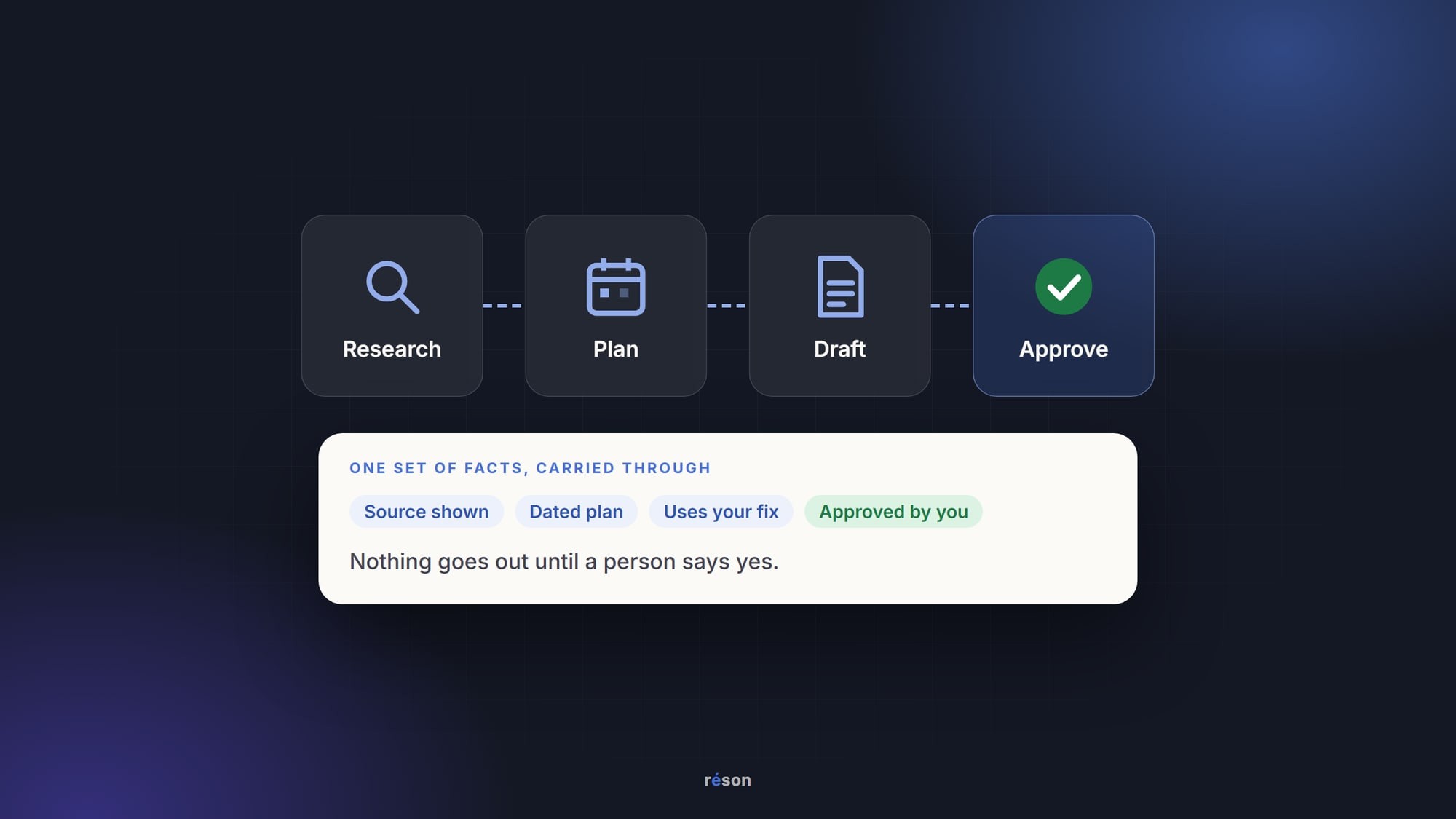
If you want the drafting and the consent records in one place, you can start a Réson workspace for your business. Réson is an AI marketing workspace for small businesses in Canada and Québec. Its Studio drafts newsletters and announcements in English or French from your business profile. You review each one and send it through your own email provider. An automation can prepare next month's draft on a schedule, and nothing goes out without your approval.
Reach keeps a consent record for each contact: express or implied, where it came from, and when implied consent expires. Outreach leaves out contacts with unknown or expired consent, and people who unsubscribe go on a suppression list. For now, you review each draft and then export or download it. Sending email through a connected account is being added as each integration becomes available. Réson helps you follow good consent practice, but it isn't legal advice.
There is a free 14-day trial with every feature and no credit card. Plans start at CA$79 a month after that.
Frequently asked questions
Do I need permission to send a newsletter to my customers in Canada?
Yes. Under Canada's Anti-Spam Legislation, a newsletter that promotes your business needs consent. Express consent, such as a sign-up on your form, lasts until the person unsubscribes. Implied consent from a purchase lasts two years, and from an inquiry six months. You must be able to prove consent, so keep sign-up records. This is general information, not legal advice.
Can I use ChatGPT to write my small business newsletter?
Yes, as long as you give it your own material. Paste in a short fact sheet with prices and hours, plus this month's notes, and ask it to use only those facts and to mark anything it guessed. Then check every price and date, cut phrases you would never say, and add one detail only you know. Send the final text through your email service.
How often should a small business send a newsletter?
Pick the pace you could keep in your busiest month. For many small businesses that is once a month. A steady monthly issue with one useful thing in it does more than frequent issues that stop after a few months. If you can't think of three issue ideas before you start, wait until you can.
Are email open rates accurate?
Only roughly. Apple says its Mail Privacy Protection prevents senders from seeing whether a reader opened an email, so open figures for those readers don't show what they did. Use opens as a trend over months. Judge each issue by clicks, replies and real actions such as orders or a code redeemed, and compare it with your own past issues.
What does every newsletter need in its footer under CASL?
Your business name and a mailing address, plus one more way to reach you: a phone number, an email address or a web address. It also needs an unsubscribe link that costs the reader nothing. The link must keep working for at least 60 days, and you must act on requests within 10 business days. This is general information, not legal advice.
Sources
- Canada's Anti-Spam Legislation, S.C. 2010, c. 23, sections 1-8 (Justice Laws)laws-lois.justice.gc.ca
- Canada's Anti-Spam Legislation, sections 9-15 (Justice Laws)laws-lois.justice.gc.ca
- Electronic Commerce Protection Regulations (CRTC), SOR/2012-36laws-lois.justice.gc.ca
- CRTC enforcement advisory: how to keep records of consentcanada.ca
- Getting consent to send emails (Government of Canada, ISED)ised-isde.canada.ca
- Use Mail Privacy Protection on iPhone (Apple Support)support.apple.com
- Email sender guidelines (Gmail Help)support.google.com
About the author
Réson
Réson is an AI marketing workspace for small businesses. It learns your business from your website, drafts posts, campaigns and articles, and waits for your approval before anything goes out.